
Operations
ISP Inventory Management: Streamline Stock and Purchase Orders with Sonar
Learn how Sonar's Inventory module offers an efficient solution to streamline your ISPs inventory management
Taneil Currie, Former Senior Manager, Growth Marketing
November 9, 2023 · 4 MIN · UPD JUN 16, 2026
Effective inventory management helps ISPs keep the right stock on hand, prevent service disruptions, and reduce costly errors. Sonar's Inventory module streamlines the full process, from configuring models to tracking stock and purchase orders, so your team always has what it needs to complete installs and keep customers satisfied.
Effective inventory management is crucial for any organization, especially for internet service providers. It ensures that you have the right stock on hand when you need it, preventing service disruptions and maintaining customer satisfaction. Sonar's Inventory module offers an efficient solution to streamline your inventory management process. In this article, we will explore how Sonar's Inventory module can help you manage your inventory effectively and simplify the procurement process, reducing errors and improving operational efficiency.
Managing Your ISP Inventory in Sonar
Sonar's Inventory module provides two primary views: the model management interface and the item management interface. To make the most of this system, you need to configure manufacturers, categories, and inventory locations before adding items.
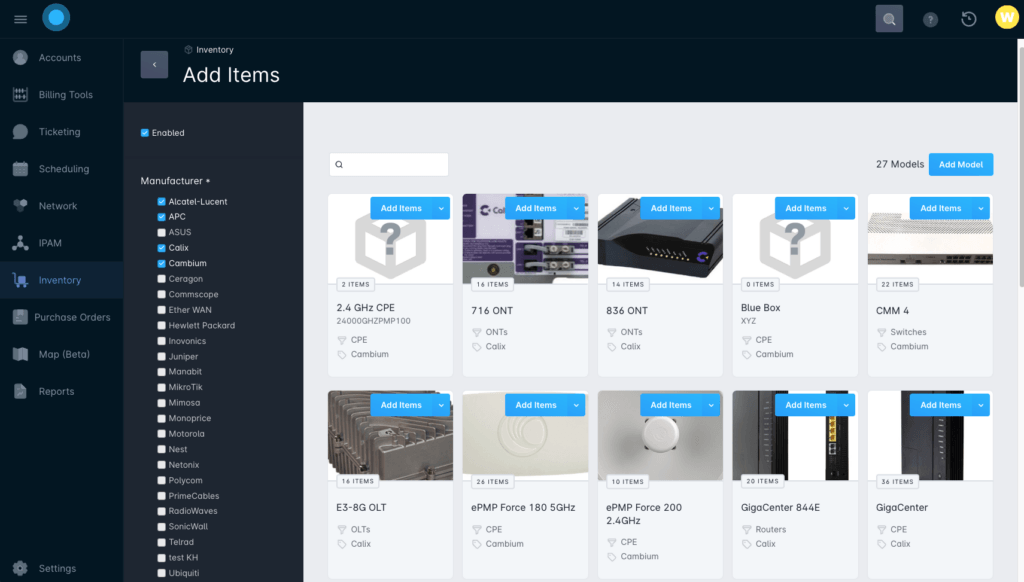
Once these organizational parameters are set, you can create inventory models within your instance. The model management interface allows you to define specific details for each inventory model, including model information, mandatory and optional hardware information, deployment types, and provisioning details. Models need to be associated with a manufacturer, which is why it's essential to create manufacturers and categories first.
After creating inventory models, adding items is a straightforward process. Each model has a button to create items, ensuring consistent tracking of all inventory items. You can also add items as "Generic" inventory to track consumable or non-specific items, which may not be traditionally monitored, such as cable spools or wiring. This feature enhances flexibility in your inventory management, making it easy to track items, changes, and remaining inventory numbers.
In summary, Sonar's Inventory module simplifies inventory management by creating a scalable baseline. Each step builds on the previous ones, ensuring consistency and following best practices for long-term success.
Purchase Orders That Simplify ISP Procurement
Maintaining consistent inventory levels is crucial to complete customer installations, replace equipment, and expand your network. Sonar's purchase order module simplifies the procurement process.
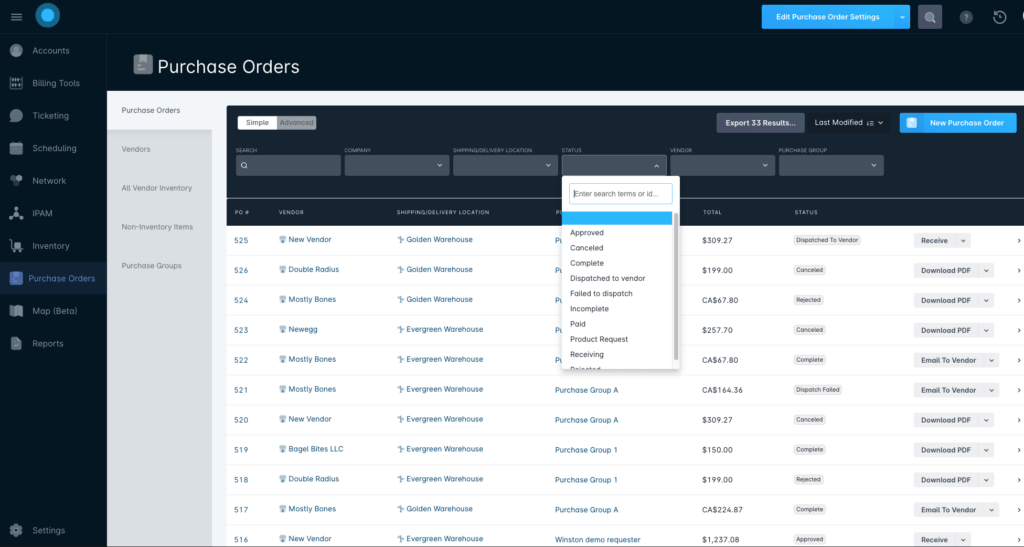
To use this module, you first need to configure your vendors. Vendor setup includes defining their email address, currency, payment terms, taxes, and whether purchase orders should be automatically emailed upon approval. You can also associate specific inventory models with vendors, enhancing transparency in your supply chain. Additionally, you can add non-inventory items to represent predictable charges, such as shipping or labor costs.
Creating a Purchase Group allows you to control which users can request and approve purchase orders. You can set automatic approval thresholds for small purchases.
Creating a purchase order is a straightforward process, and it can be initiated from any segment of the purchase order module. Once created, the purchase order will need approval before being emailed to the vendor. Sonar tracks each stage of the procurement process, giving you full control over each purchase order. You can also download purchase orders as PDFs.
Integrations and Interactions
Sonar offers several integrations to enhance your inventory and purchase order management:
Reporting Module
The reporting module provides a variety of reports, allowing you to track inventory usage and procurement over time. Customizable reports can be shared with your team, enabling everyone to work off the same base report tailored to their specific role.
Field Technician Mobile App
The field tech mobile app, available on both Android and iOS, allows your technicians to access Sonar's interface on the go. It can be used for scanning received inventory items into your system, eliminating the need for bulky handheld scanners.
Final Thoughts
Streamlining your inventory management with Sonar's Inventory module and purchase order system is the key to reducing errors, automating time-consuming tasks, and simplifying your ISP's operations. Whether it's your warehouse team or individual users, Sonar offers flexibility to manage inventory your way. By leveraging these features, you can ensure continued growth and success for your ISP while maintaining high levels of customer satisfaction. Sonar's integrated tools, combined with effective inventory management, are a winning combination for your business.
Frequently asked questions
What do you need to configure before adding items in Sonar's Inventory module?
Before adding items, configure manufacturers, categories, and inventory locations. Because each inventory model must be associated with a manufacturer, creating manufacturers and categories first ensures consistent tracking.
Can ISPs track consumable items like cable and wiring in Sonar?
Yes. You can add items as "Generic" inventory to track consumable or non-specific items, such as cable spools or wiring, that are not traditionally monitored, making it easy to track changes and remaining inventory numbers.
How do purchase orders work in Sonar?
After configuring vendors and a Purchase Group, you create a purchase order from any segment of the module. It needs approval before being emailed to the vendor, Sonar tracks each stage of the procurement process, and you can download purchase orders as PDFs.
Questions, answered.
How does Sonar's Inventory module help ISPs manage inventory?
Sonar's Inventory module gives ISPs two primary views, a model management interface and an item management interface. Together these let ISPs track their equipment and supplies in one place.
What do you need to configure before adding items in Sonar's Inventory module?
Before adding items, ISPs must configure manufacturers, categories, and inventory locations in Sonar. Manufacturers and categories are created first because inventory models must be associated with a manufacturer.
How do purchase orders work in Sonar for ISP procurement?
Sonar's purchase order module tracks every stage of procurement and requires approval before a purchase order can be emailed to vendors. Purchase orders can also be exported as PDFs.
Can Sonar track consumable supplies like cable and wiring?
Yes. Sonar's Generic inventory lets ISPs track consumable or non-specific items such as cable spools and wiring, separate from serialized equipment models.
See it on the platform
20 minutes wired to your operation.
An ISP-only specialist walks Sonar through your specific use case. No generic deck, no horizontal SaaS pitch.
Book a meeting