
Product
Billing Quiet Hours for ISPs: Why Notification Timing Matters
Billing Quiet Hours allows internet service providers to designate specific times during which billing-related notifications are paused.
Taneil Currie, Former Senior Manager, Growth Marketing
April 15, 2024 · 3 MIN · UPD JUN 16, 2026
Billing Quiet Hours is a Sonar feature that lets internet service providers (ISPs) pause billing-related notifications during set times, so invoices, payment reminders, and usage alerts never reach subscribers at inconvenient or non-compliant hours.
In a world of 24/7 connectivity, the timing of billing notifications is more than just a logistical consideration - it's a key factor in customer satisfaction. While it's essential to keep clients informed about their account status, the timing of these communications can have a significant impact on customer satisfaction. Sending payment reminders late at night or disregarding time zones risks frustrating your customers, and in some states and jurisdictions, there's actually consumer protection legislation that restricts businesses from sending billing related communications to their customers during defined hours of the evening and overnight. That's where Billing Quiet Hours comes in.
What are Billing Quiet Hours for ISPs?
Billing Quiet Hours is a feature in Sonar that allows internet service providers to designate specific times during which billing-related notifications are paused. This means you can control when invoices, payment reminders, usage alerts, and other billing communications reach your customers.
Benefits of Billing Quiet Hours for subscriber communications
Improved Customer Experience: Respecting your customers' downtime by avoiding unnecessary disruptions during off-hours is vital for a positive customer experience.
Enhanced Brand Reputation: Billing Quiet Hours show that you're a company that understands the importance of customer-centric practices. It builds positive brand perception.
Streamlined Billing Communications: Billing Quiet Hours helps create a more organized and intentional billing communication schedule, preventing potential overlaps or bombardments of messages.
Stay Compliant: If your operations fall under such regulations, our Billing Quiet Hours feature offers a solution. These communications will then be queued and automatically released once the designated quiet period has ended, ensuring compliance with relevant regulations while maintaining effective communication practices.
Watch the video to learn more about how Billing Quiet Hours works with our Communication Tools in Sonar

How to Set Up Billing Quiet Hours in Sonar
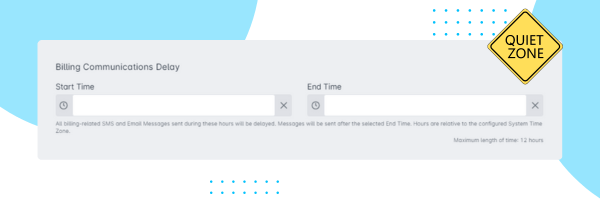
Setting up Billing Quiet Hours in Sonar is pretty easy 👇
Log in to your Sonar dashboard
Navigate to "Companies" and select your desired company
Click on "Basic Company Setup"
Locate the "Billing Communications Delay" section
Toggle the "Enable Billing Quiet Hours" option
Set your preferred quiet hours (start and end times)
Click "Save Changes"
Best Practices for Scheduling Billing Quiet Hours
Late-Night Reminders: Avoid sending payment reminders after typical work hours.
Time Zone Respect: If you serve customers in multiple time zones, set quiet hours accordingly.
Optimal Schedule: Consider customer habits and your support team's availability when determining your quiet hours.
Final Thoughts
As Internet Service Providers continue to navigate the complexities of modern communication, integrating solutions like Billing Quiet Hours will undoubtedly play a pivotal role in shaping positive customer experiences and driving long-term success. Remember, a little consideration goes a long way. Billing Quiet Hours is a powerful tool to show your customers that you value their time.
Ready to give your customers a break from untimely billing notifications? Try Sonar's Billing Quiet Hours feature today! If you have any questions or need further guidance, **schedule a demo**.
Frequently asked questions
What are Billing Quiet Hours?
Billing Quiet Hours is a Sonar feature that lets ISPs designate specific times during which billing-related notifications, such as invoices, payment reminders, and usage alerts, are paused.
Do Billing Quiet Hours help with compliance?
Yes. In some states and jurisdictions, consumer protection legislation restricts when businesses can send billing communications. With Billing Quiet Hours, those messages are queued and automatically released once the quiet period ends, helping ISPs stay compliant.
Where do I enable Billing Quiet Hours in Sonar?
In your Sonar dashboard, go to "Companies," select your company, open "Basic Company Setup," find the "Billing Communications Delay" section, toggle "Enable Billing Quiet Hours," set your start and end times, and save.
Questions, answered.
What are Billing Quiet Hours for ISPs?
Billing Quiet Hours is a Sonar feature that lets internet service providers designate specific times when billing-related notifications are paused. It gives ISPs control over when invoices, payment reminders, and usage alerts reach subscribers.
What happens to billing notifications sent during quiet hours?
Notifications sent during quiet hours are queued rather than delivered immediately. They are automatically released once the quiet period ends.
Can Billing Quiet Hours help ISPs stay compliant with consumer protection laws?
Yes. Some states and jurisdictions restrict billing communications during evening and overnight hours, and Billing Quiet Hours helps ISPs stay compliant with those rules.
How should ISPs set Billing Quiet Hours when serving multiple time zones?
ISPs serving multiple time zones should set quiet hours to respect each customer's local schedule. This keeps notification timing appropriate for subscribers no matter where they are located.
See it on the platform
20 minutes wired to your operation.
An ISP-only specialist walks Sonar through your specific use case. No generic deck, no horizontal SaaS pitch.
Book a meeting