
Product
How to Automate Tax Compliance for ISPs with the Sonar Avalara Integration
The communication services industry is one of the most heavily taxed & regulated businesses. Learn how to automate your taxes processes
January 29, 2023 · 5 MIN · UPD JUN 16, 2026
ISPs can automate tax compliance by connecting Avalara's cloud tax engine to their billing system. The Sonar Software Avalara integration calculates, applies, and reconciles communications taxes directly inside your Sonar instance, across recurring, one-time, VoIP, and data services, so your team can stop manually tracking rate changes.
Regardless of business size or type, one thing that remains certain is that tax compliance is an absolute must; and while acceptance of this statement is easy enough, the reality is that compliance is anything but. Tax legislation often changes and it becomes a challenge to keep track of these changes at the state, federal, and even international levels. Unfortunately, mistakes made are not always easily rectified and the consequences for noncompliance can be dire. This is why the need for tax experts has never been higher.
Avalara live and breathe tax compliance, so much so that they've been named a leader in tax automation in worldwide SaaS and cloud-enabled tax automation. With customers around the world, they're committed to ensuring they stay on top of tax legislation at the highest level. And with a fully integrated SaaS solution in place, they're able to regularly update any tax rules that affect your business, thereby allowing you to focus on other important matters, like improving and expanding your business.
Automate taxation from within your Sonar instance
Our seamless Avalara integration takes this one step further by optimizing the entire taxation process from within your Sonar instance. Avalara can be used in conjunction with any service in your instance, whether it be a recurring or one time service, VoIP or even data. And to make things even easier, representatives don't have to worry about calculating the tax amount when issuing refunds or making adjustments; with the two systems synced, Avalara will automatically handle that on their behalf.
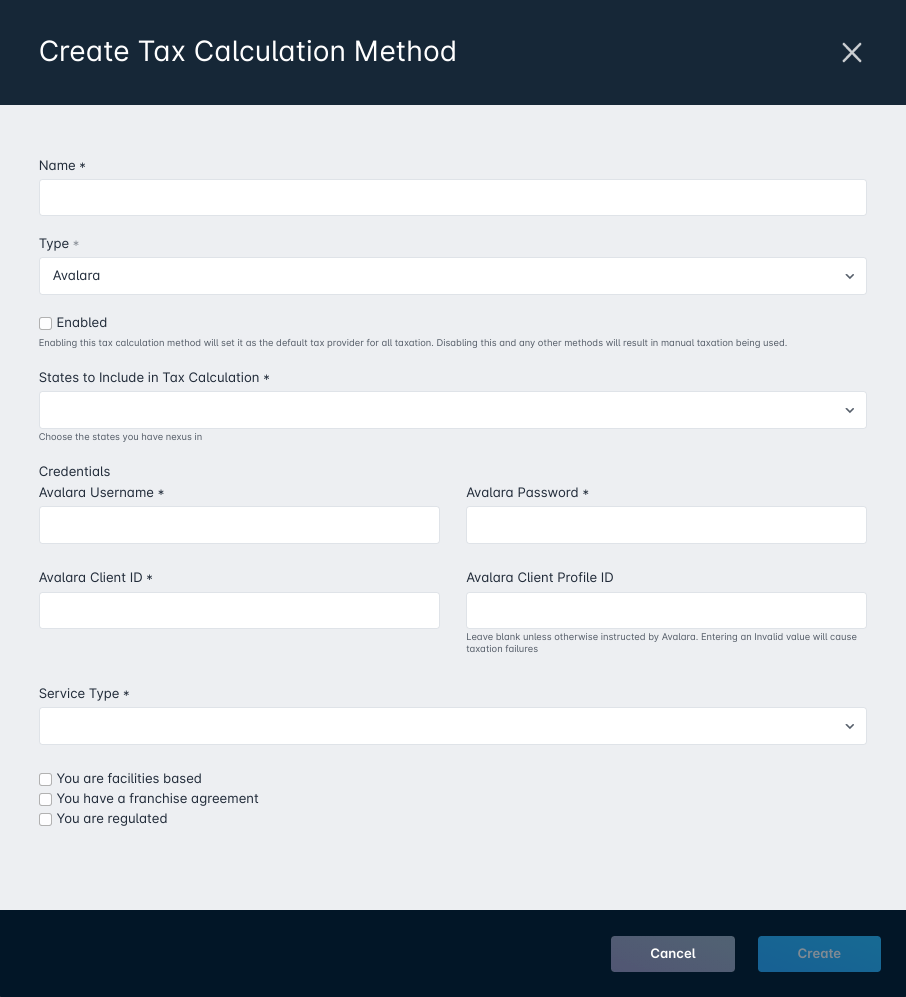
How to set up the Avalara integration in Sonar
It only takes a few moments to configure your Avalara account; once complete, the two will maintain an automatic sync. All you need is to select which states are to be included in the tax calculation, input your Avalara account details (such as the username, password, and client ID), and then set the service type as directed by Avalara ahead of time. The final step to integration is adding check marks alongside the three qualifiers: Avalara facilities based, Avalara franchise agreement, and Avalara regulated.
Once set up in your instance, you can then reflect which service will use it; there may be circumstances in which you only wish to use Avalara for select services, or you may intend to use Avalara across the board. In either scenario, each service is manually managed to reflect the choice, allowing you to retain total control even with a hands off approach to taxation. Any services that are to utilize Avalara will need to be updated to select the appropriate Tax Type and Discount Tax Type (if applicable), as already set by Avalara.
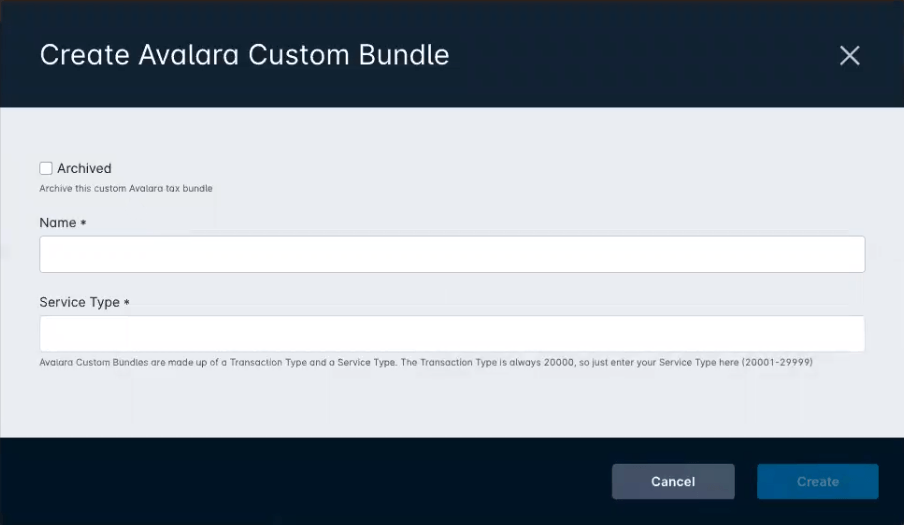
Custom bundles and per-service tax types
This integration isn't intended to act as a one size fits all solution though; along with having the ability to select which services utilize this taxation method, you're also able to manually add custom bundles into your instance. If you're unfamiliar with what these are, the long and short of it is that they're built by Avalara dependent on specific classifications set by your organization. When created, you are provided a custom T/S pair (transaction/service type) that can then be loaded into your Sonar instance via the Avalara Custom Bundles menu. Once complete, you would then apply the bundle just as you would a regular tax type.
Any applied tax types are easily found on a customer account by expanding the Tax Transactions menu on each transaction. In doing this, you're able to see the exact tax type and subsequent amount charged that corresponds with the transaction selected. And, as mentioned earlier, if a transaction is reversed, the agent only needs to reverse the service fee amount, as the process will prompt a sync with Avalara to reverse the tax portion automatically.
Handle tax exemptions at the customer account level
Utilizing Avalara isn't just about applying taxes, though, as you will inevitably service a customer that is exempt from certain tax types. In this event, you're able to efficiently reflect this by creating a tax exemption at the customer account level. In just a few simple steps, you can indicate which jurisdictions the exemption applies to and which tax types they are exempt from. Following this, any transactions issued on the customer account will follow the specific exemption rules outlined.
Track tax errors with built-in logs
The decision to outsource any part of your business is a big one, but you don't have to fret when using Avalara. Along with the features mentioned already, you can also keep track of any error logs when it comes to taxation. Each customer account logs any account-specific errors under the easily found Avalara header. And for a more comprehensive view of your instance, all errors can be viewed in your instance settings. With this access only a few clicks away, any issues that require your attention are easily identifiable and just as easily rectified with Avalara's expertise.
Don't let tax compliance slow you down; contact Avalara to see how they can take on the burden, and when you're ready, take a look at our Knowledge Base for integration steps.
Frequently asked questions
Which services can use the Avalara integration in Sonar?
Avalara can be used in conjunction with any service in your instance, whether it is a recurring or one time service, VoIP, or even data. Each service is managed individually, so you can apply Avalara to select services or across the board while retaining total control.
What happens to tax when a transaction is refunded?
Representatives only need to reverse the service fee amount. With the two systems synced, Avalara automatically reverses the corresponding tax portion, so there is no manual tax calculation when issuing refunds or adjustments.
How are tax-exempt customers handled?
You create a tax exemption at the customer account level, indicating which jurisdictions the exemption applies to and which tax types they are exempt from. Any transactions issued on that account then follow the specific exemption rules outlined.
Questions, answered.
How do ISPs automate tax compliance for VoIP, data, and recurring services?
The Sonar Avalara integration automates tax compliance directly inside your Sonar instance for recurring, one-time, VoIP, and data services. Once it is configured, Sonar and Avalara maintain an automatic sync, and Avalara updates the tax rules that affect your business.
Can operators apply the Avalara integration to only some services in Sonar?
Yes. Each service in Sonar is managed individually, so operators can apply Avalara to select services or across the board while keeping full control.
How are tax exemptions handled with Avalara in Sonar?
Tax exemptions can be created at the customer account level. You specify which jurisdictions and tax types the exemption applies to.
What happens to the tax amount when a transaction is reversed?
When a transaction is reversed, agents only reverse the service fee amount. Avalara automatically reverses the tax portion.
See it on the platform
20 minutes wired to your operation.
An ISP-only specialist walks Sonar through your specific use case. No generic deck, no horizontal SaaS pitch.
Book a meeting