Product
A Deeper Dive Into the New Sonar GraphQL API: Complex Queries
In this article, I’m going to dive into the real power of this API and show you how to construct some complex, powerful queries.
September 23, 2020 · 9 MIN · UPD JUN 16, 2026
In my last article, I talked about the basic structure of the new, GraphQL powered Sonar API and showed you how to construct some basic queries. If you haven't read that article yet, start with the new Sonar API basics!
The Sonar GraphQL API lets ISP teams build complex, precise queries using interfaces, polymorphic relationships, advanced searches, reverse relation filters, and aggregations. In this article, I'm going to dive into the real power of this API and show you how to construct some complex, powerful queries.
GraphQL interfaces and polymorphic relationships
In the last article, I skipped over the Implements heading under accounts and said we'd come back to it later. Let's get that out of the way now!
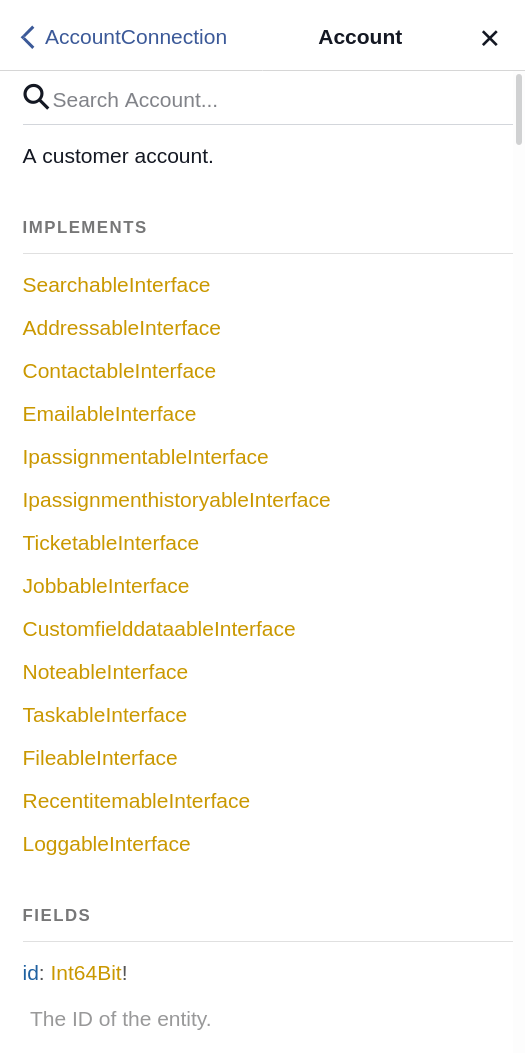
GraphQL supports the concept of interfaces, which is described in the GraphQL documentation as being the following:
An abstract type that includes a certain set of fields that a type must include to implement the interface.
The list of interfaces under Implements are interfaces that this entity uses. Instead of talking in the abstract, I'll provide some real examples of how we use this in Sonar, using an IP assignment as our first one.
An IP assignment can exist on an inventory item, on an inventory item field (like a MAC address), on an account, on a network site, on an uninventoried MAC address, or on a account. Because an IP assignment can exist on so many different entities, it's relationship to the entity it's assigned to is described as polymorphic. This means that the relationship has a generic name, but the entity returned from that relationship can be one of multiple types. Don't worry if this seems obtuse right now - we'll dive deep enough here to explain it. If I navigate to the documentation for the IpAssignment entity in the GraphiQL documentation and scroll down, I find the following relationship.
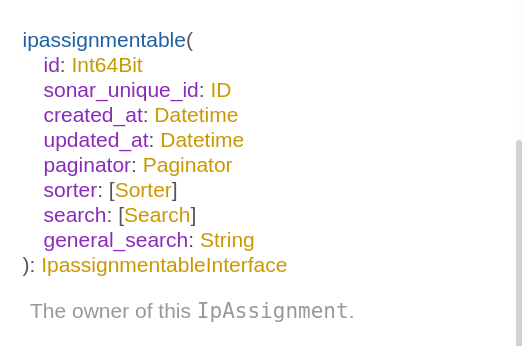
The ipassignmentable relation is the other side of this polymorphic relationship. You can see that this returns an IpassignmentableInterface, and if I click on that interface, I can see a list of the entities that use it.
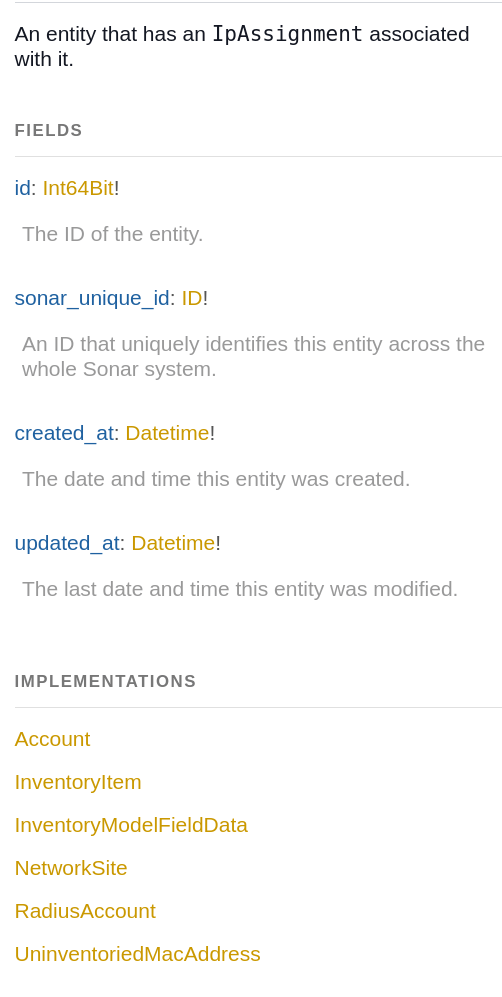
This is how you can tell what the different types of entities are that can be returned when querying the ipassignmentable relation on the IpAssignment entity. In Sonar, we always use able on the end to describe a polymorphic relationship - for example, on an Address, the relation is addressable, and on a Contact, the relation is contactable.
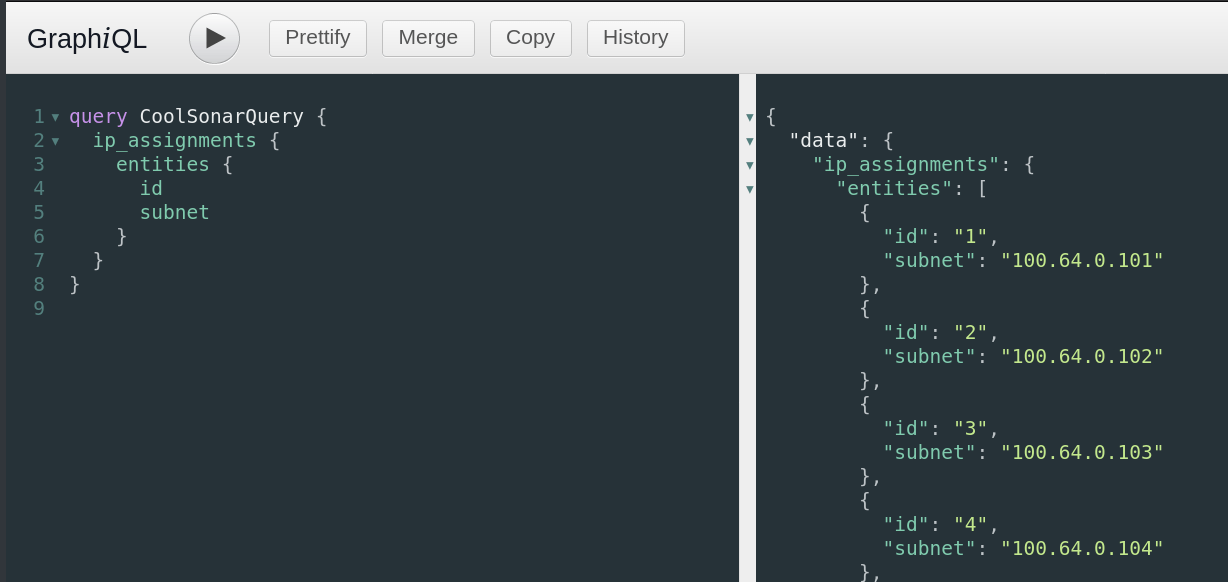
The problem with these interfaces is that they can only offer fields that are shared across all the entities that implement them. An Account has a name, but an InventoryItem does not, so as you can see in the screenshot above, name is not a field that's available on the interface. However, we can get around that - let me show you how. Below, I've built a simple query to get all the IP assignments in Sonar, returning their id and subnet.
Now let's add the ipassignmentable relation and fetch the ID of the related entity.
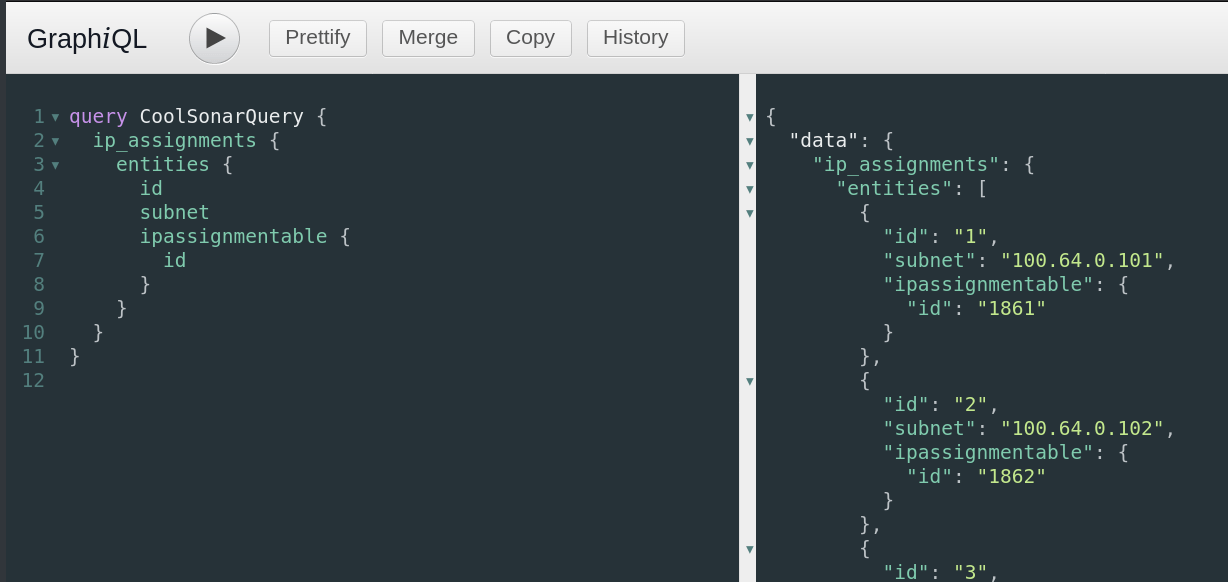
Easy enough, but what are these relations? One thing we can do to find out is use a special GraphQL property called __typename in our query. This provides the name of the entity that is being returned, and you can use this anywhere in the API.
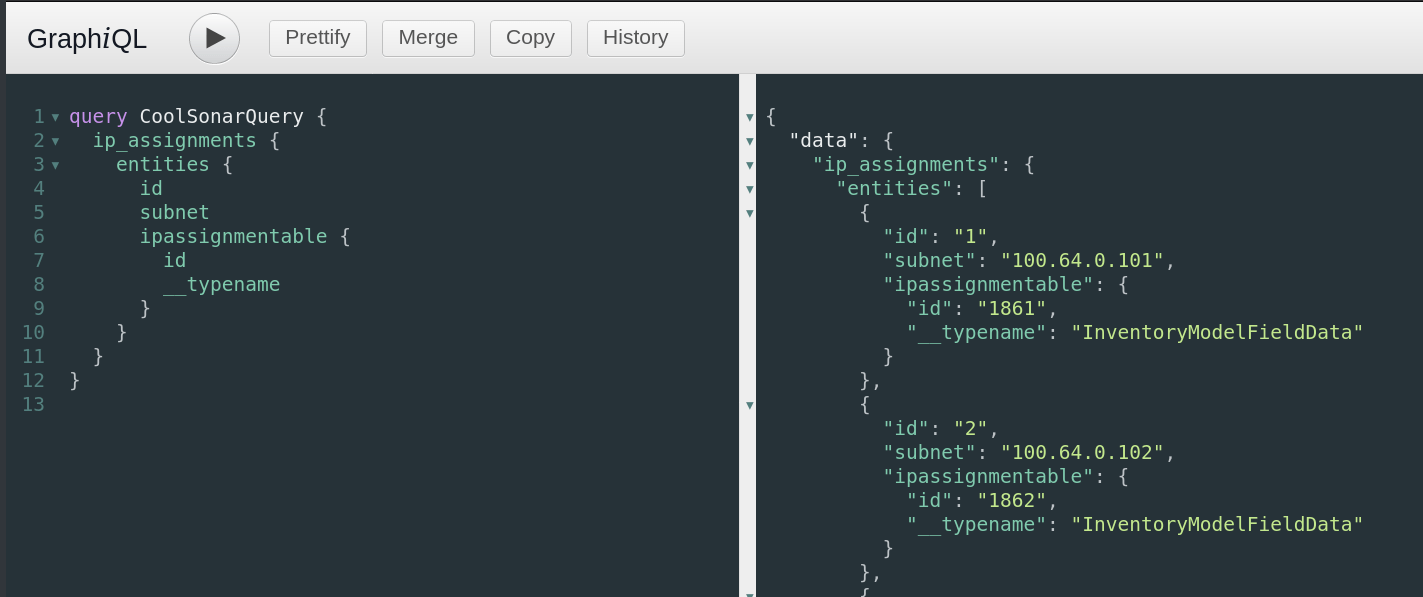
So, I can now see the first couple of entries here are IP assignments on InventoryModelFieldData entities. Now, I could grab these IDs and do a separate query against inventory_model_field_data, but we don't need to do that. Because we know the different entities that can be provided here (due to our inspection of the IpassignmentableInterface above), we can modify our query to return back specific data based on the type of entity that is being returned. First, let's check out the InventoryModelFieldData entity in the documentation to see which fields are available.
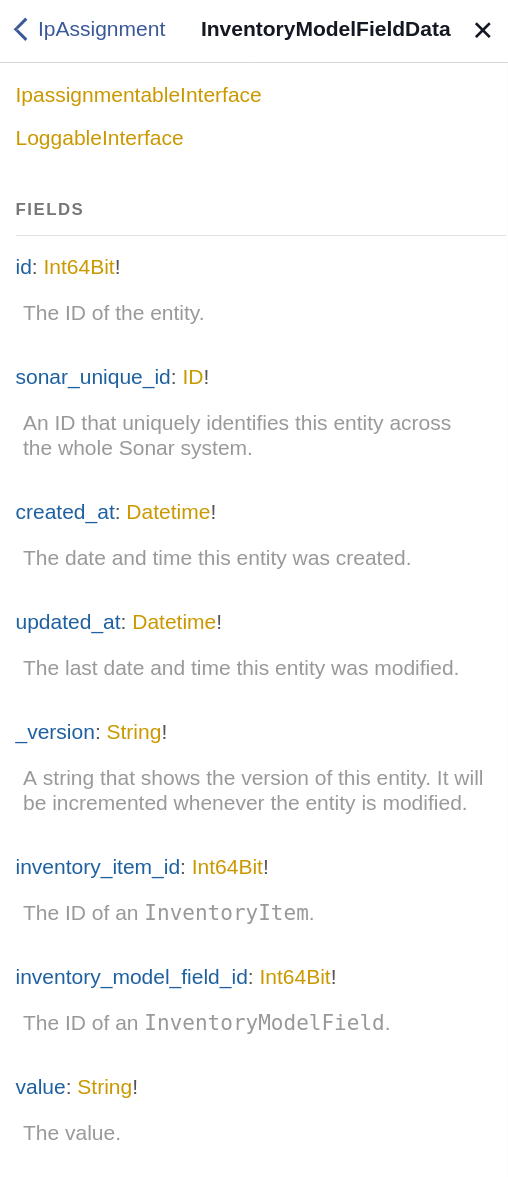
As you can see here, there are a number of fields that aren't implemented in the IpassignmentableInterface, like value and inventory_item_id, so let's grab those. In order to do this, we add to our query by asking for these two fields when the relation is an InventoryModelFieldData.
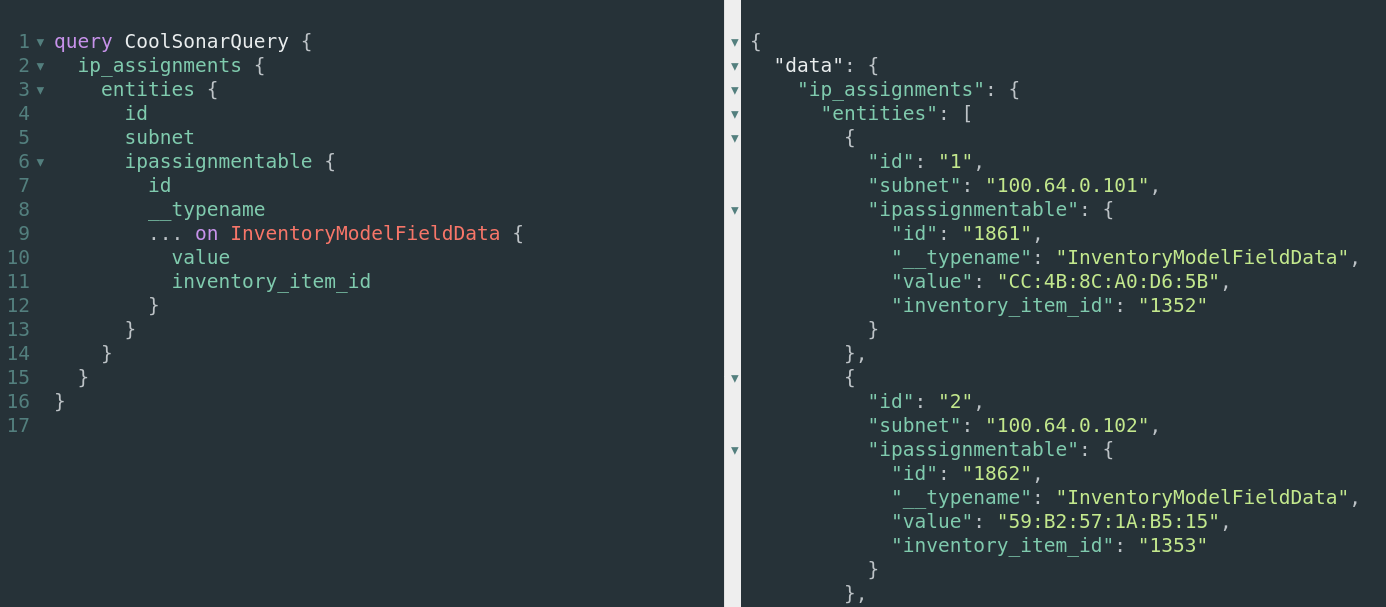
Now, whenever the relation is an InventoryModelFieldData, we also get the value and inventory_item_id fields. We can do the same thing for all the other types if we want to, including adding relations to them. See below, where I query the inventory model on an inventory item, and the manufacturer of the model.
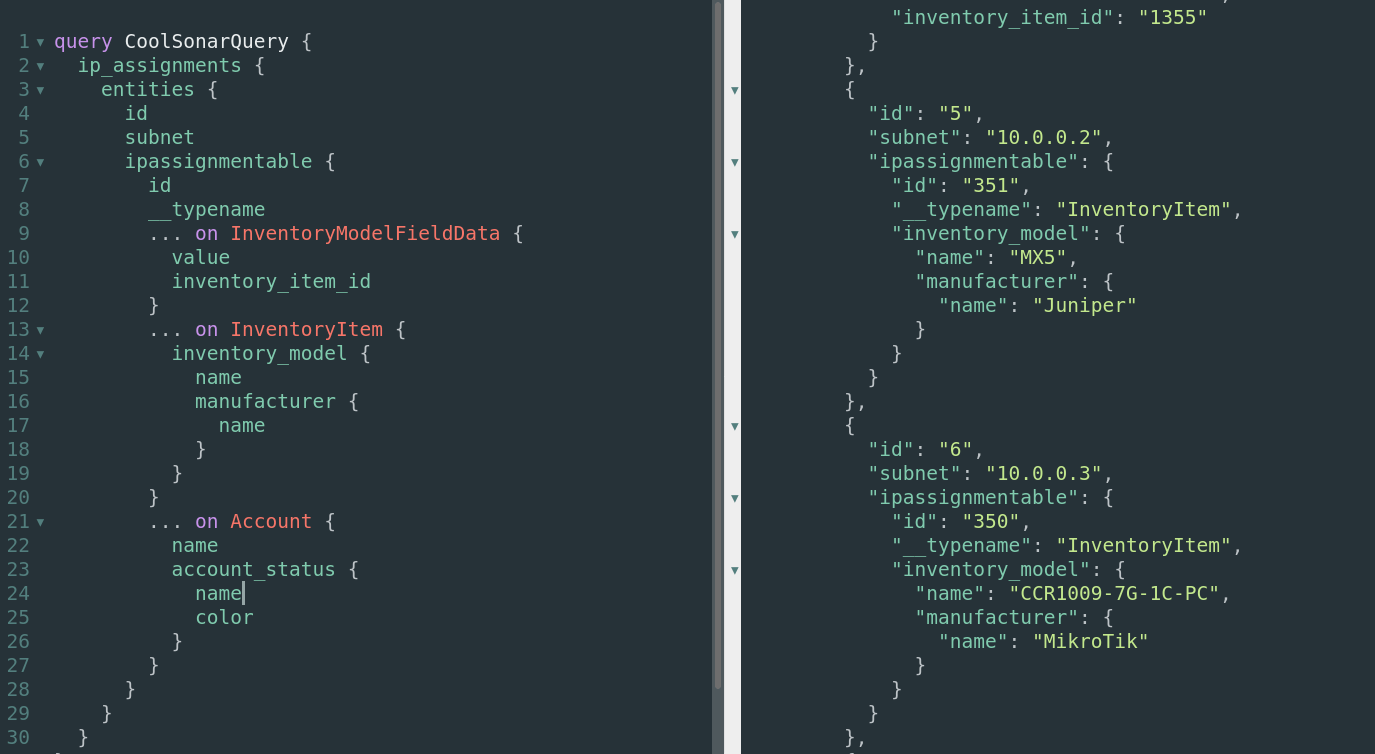
Using this strategy, it's simple to get all the data I need - even when the relation is polymorphic.
Complex searches across string and integer fields
The API also provides a way to perform extremely in depth and complex searches. If you view the documentation for the accounts query, you'll see a number of other inputs we can provide that relate to search.
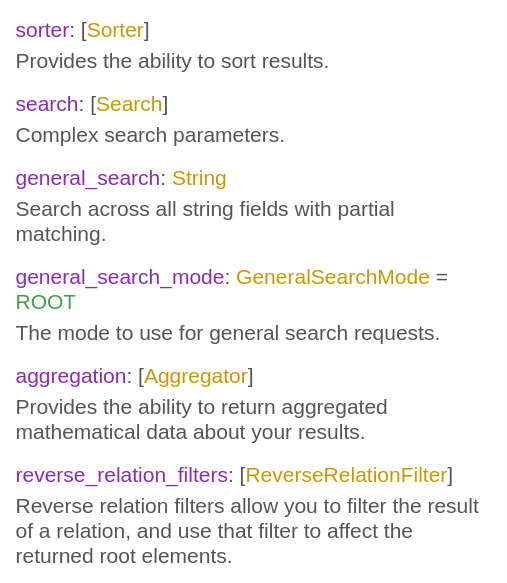
For now, let's focus on search, and we'll step through the rest shortly.
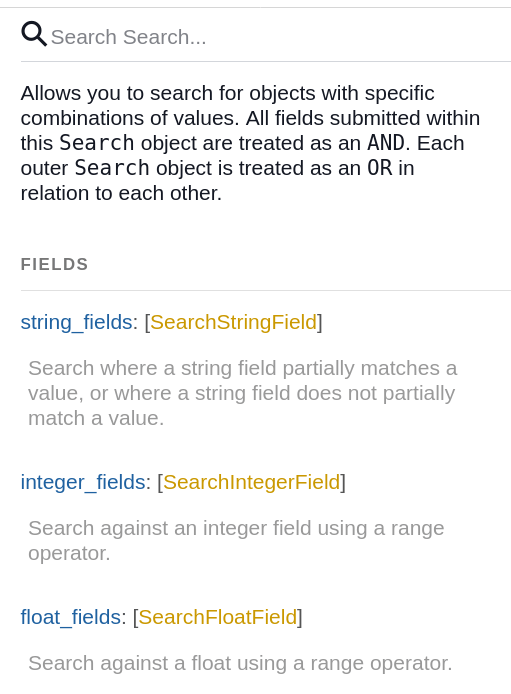
The Search object allows you to perform different types of searches against different types of fields when running a query. For example, the string_fields property lets you search any fields with a type of string, and the integer_fields property lets you search any field with a type of int or int64. Let's construct a real query here so I can show you exactly how this works.
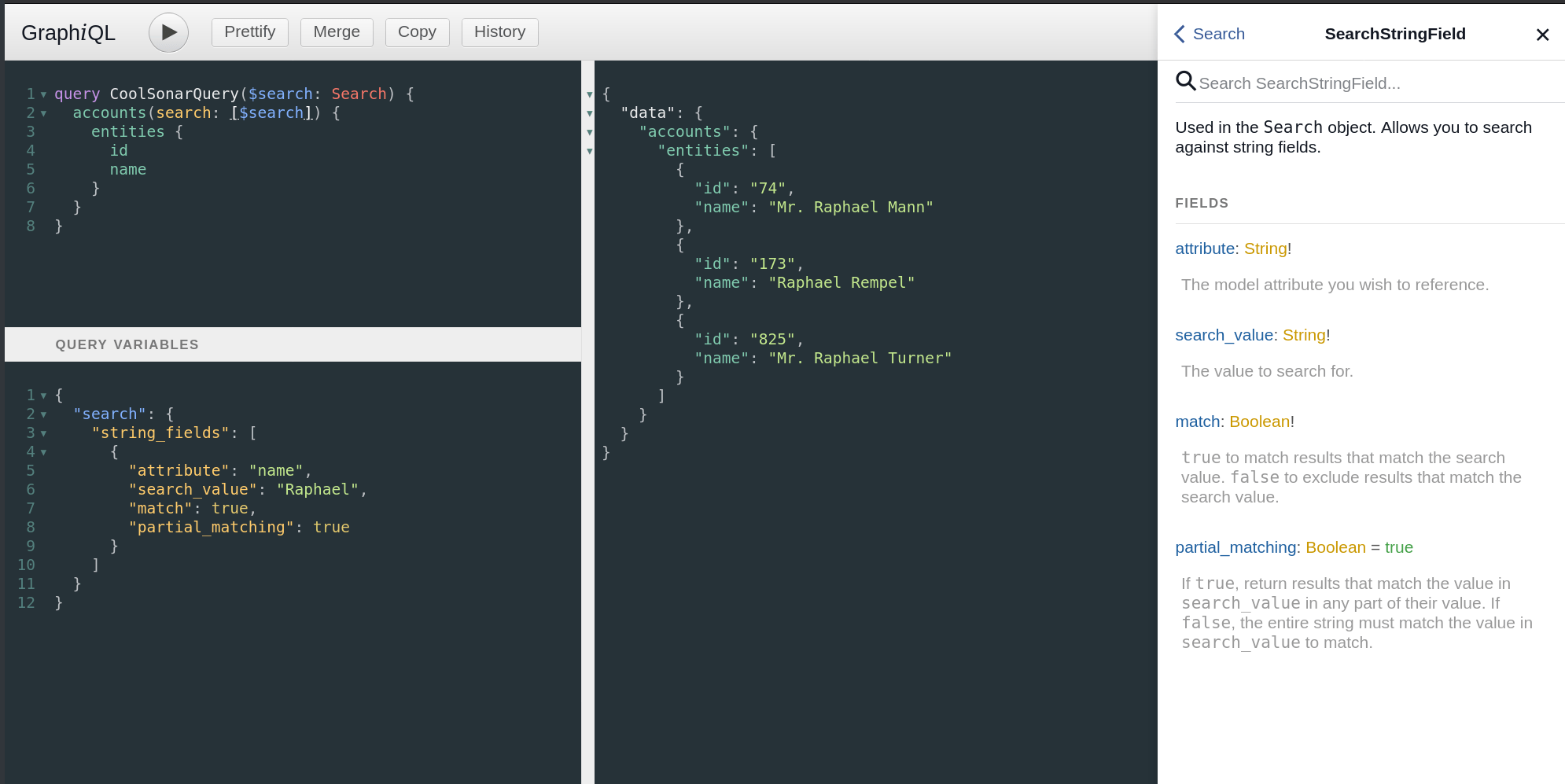
This one is a bit more complicated, so let's step through it. The documentation for the accounts query shows us that we can submit an array of Search objects using the property search. Looking at the Search object itself, we see that it has a number of properties, including string_fields, which takes an array of SearchStringField objects. Arrays are always represented using square brackets ([]) so we need to make sure to construct our query in this way.
Just like in the previous article, I've defined a variable to input into my query named $search, which is specified as a Search object. Next, I input this into the accounts part of the query by specifying the search input property, and then wrapping it in an array. Finally, in the variables section, I've built out my search variable by adding the string_fields property to it, making that an array as the documentation requires, and then adding a single object into it to search against the name property of the account. I've also specified that I want to search for the string Raphael, that I want this string to match, and I want to use partial matching. The documentation explains what each of these fields do.
Finally, I've run my query, and as you can see, I got back three accounts - each of which have the word Raphael in the name.
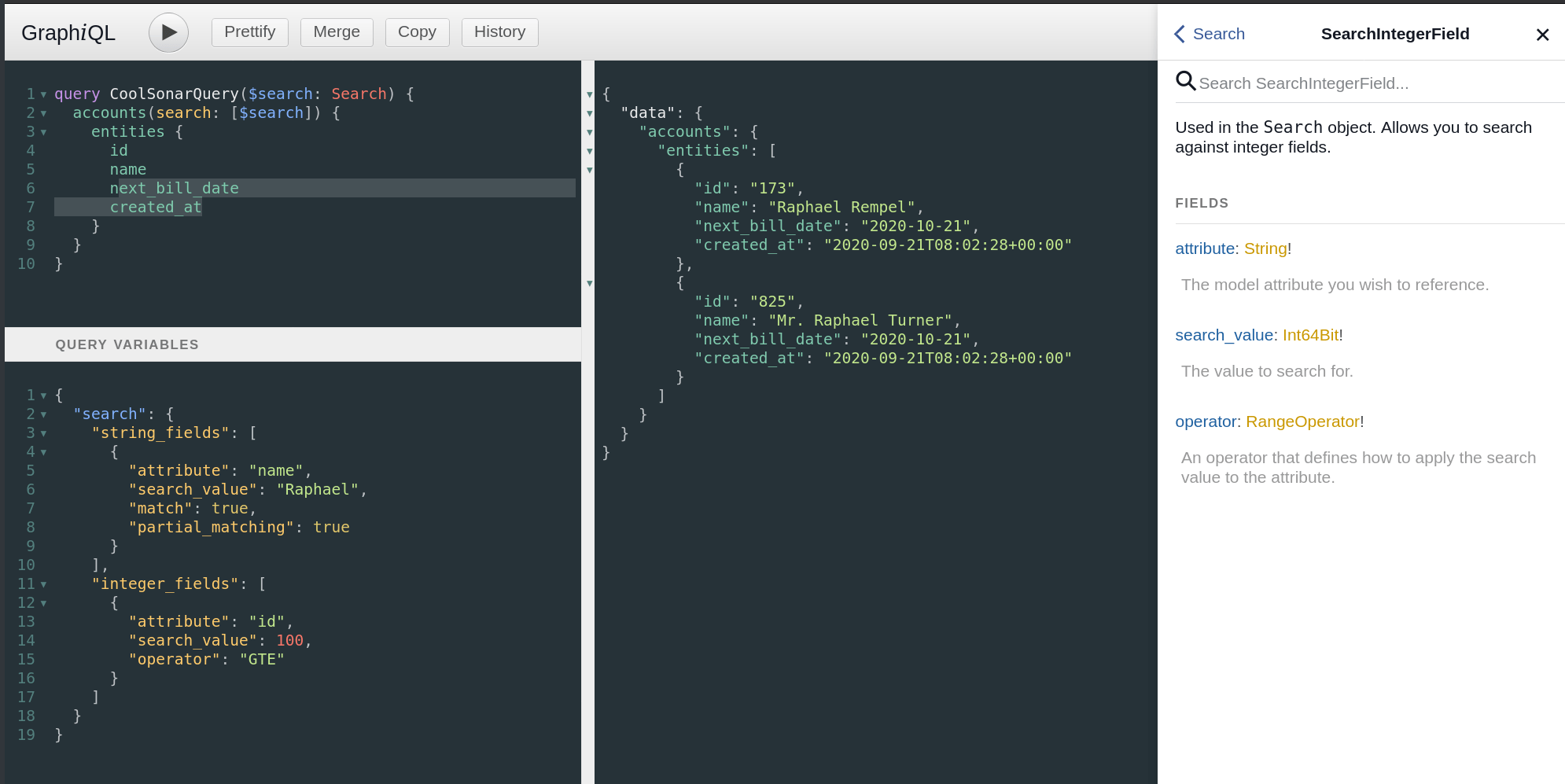
You can layer together as many of these search options as you want - here I've added the integer_fields property of the Search object, and told the API that I only want results where the id is also greater than or equal to 100.
Reverse relation filters: searching against related records
This searching is extremely powerful, as it lets you craft a query that returns exactly the objects you're looking for. But what about where you also want to search against relations? That's where Reverse Relation Filters come in.
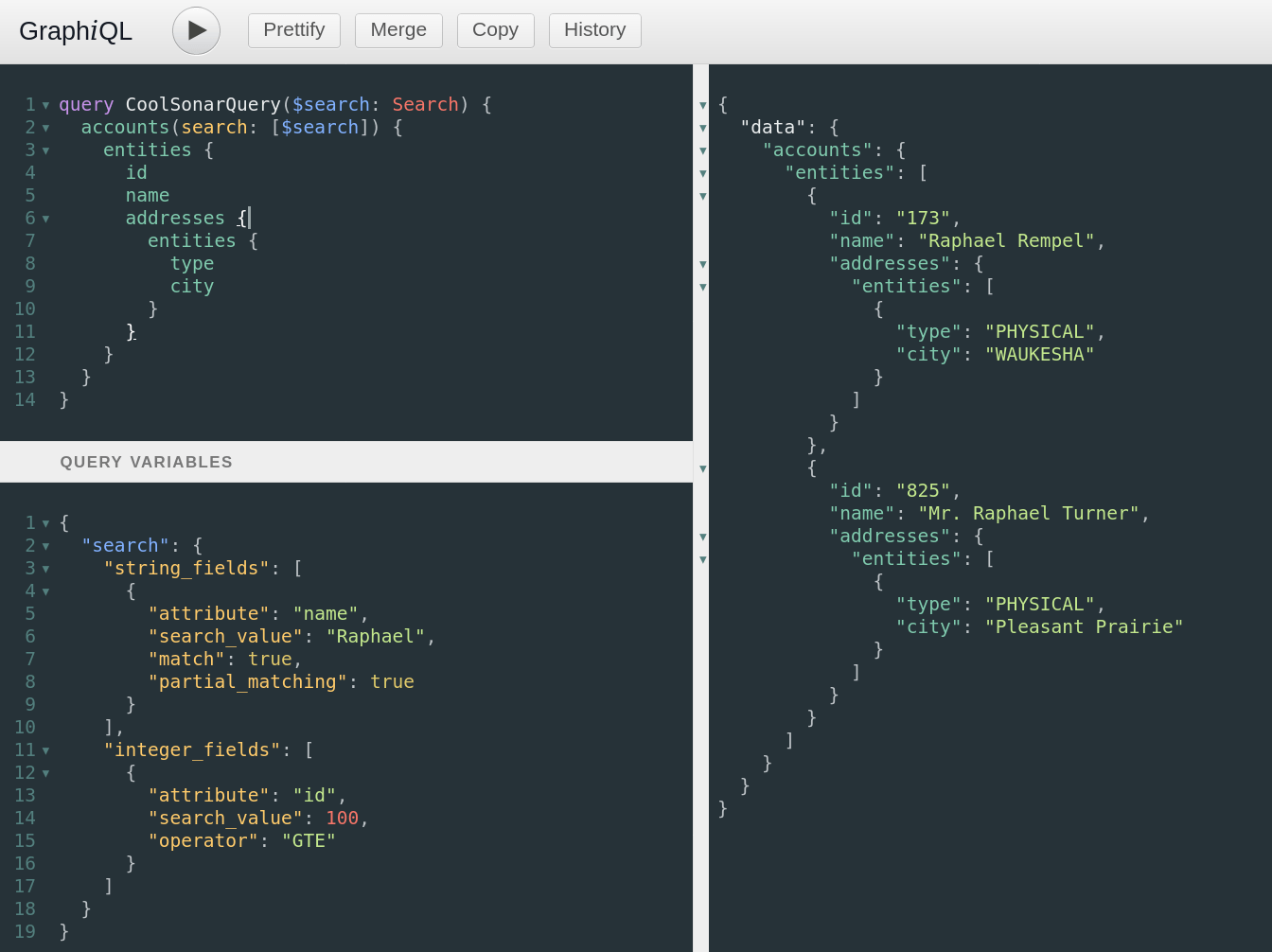
Let's keep building on our existing query, using a reverse relation filter to limit down our results even further. Here, I've expanded my query to return the address relations of my accounts, and to fetch the city on them.
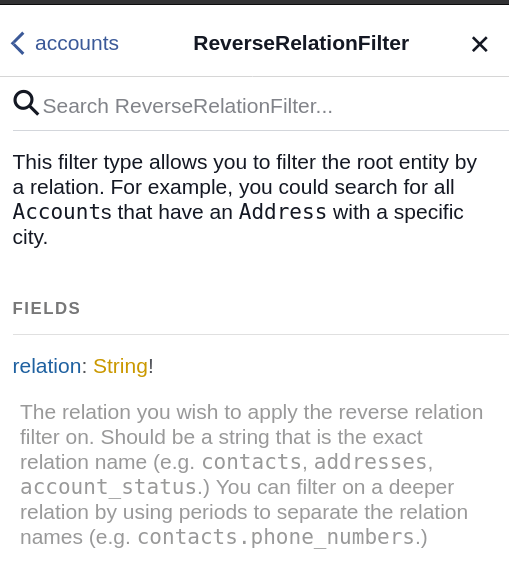
So currently, I'm filtering all my accounts to only return objects where the id is greater than or equal to 100, and the name contains the string Raphael. What if I wanted to also only fetch accounts where their physical address was in the city of Pleasant Prairie? The Reverse Relation Filter documentation shows me exactly how to do that.
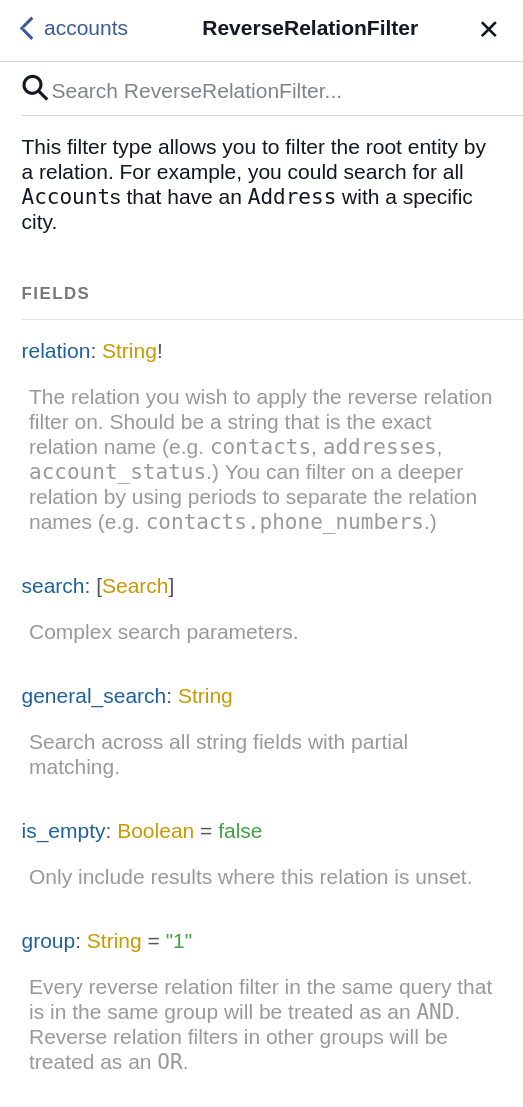
Let's build up our query!
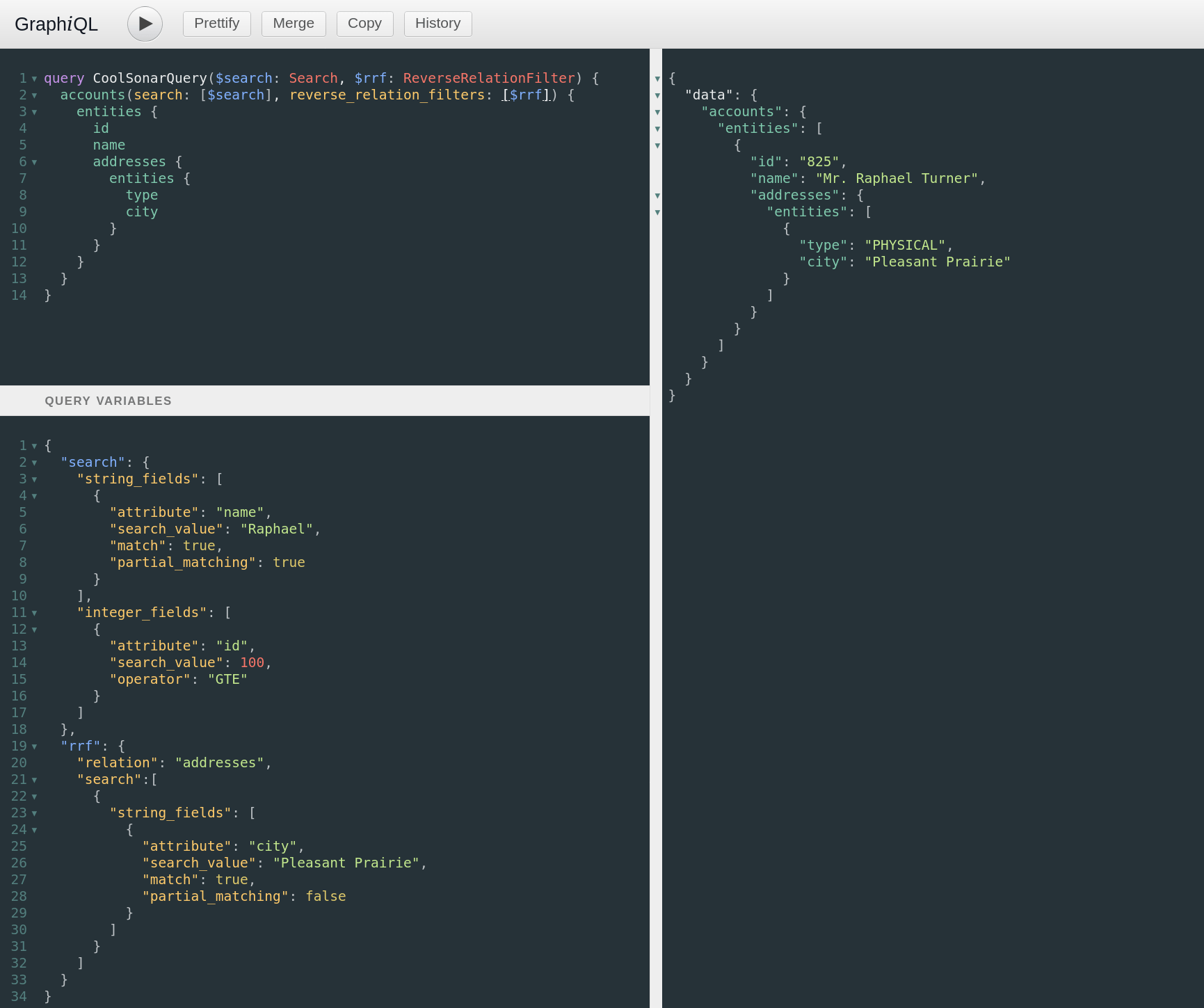
The Reverse Relation Filter is very similar to the Search object. In fact, the search property of the Reverse Relation Filter is a Search object. The filter itself has some other fields you can read about in the documentation as well.
Notice above that I input the Reverse Relation Filter to my accounts query, and I specified that I want to search inside the addresses relation. I then specified that I want to look for addresses where the city is Pleasant Prairie, and I turned off partial matching so that the city must be exactly Pleasant Prairie, and not just a string that contains the words Pleasant Prairie. Finally, I run the query and get one result.
Hopefully you can see how powerful this is, and I encourage to dig deeper into the documentation on searching and try out some things of your own. How about finding all accounts that have been delinquent for over two weeks, and owe at least $50? Or all accounts that are in an active status, that are of a residential type, and have an email address ending in @gmail.com?
Aggregations: summing across the entire data set
Searching is great, but sometimes we care about the aggregate of the results, and not just the individual items. For example, perhaps I want to know how much money a subset of customers owes me. Let's dig into aggregations!
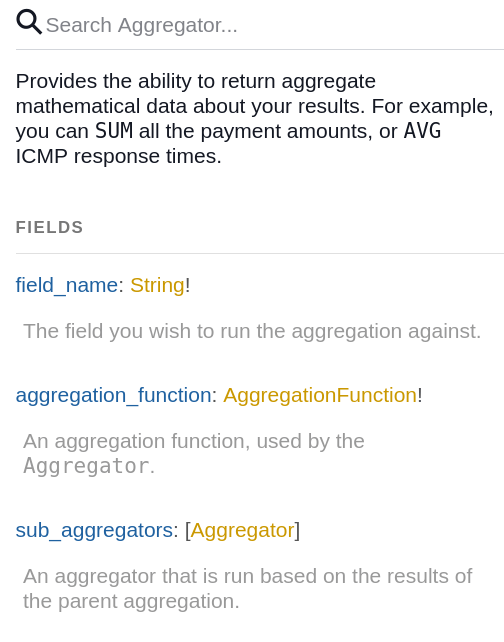
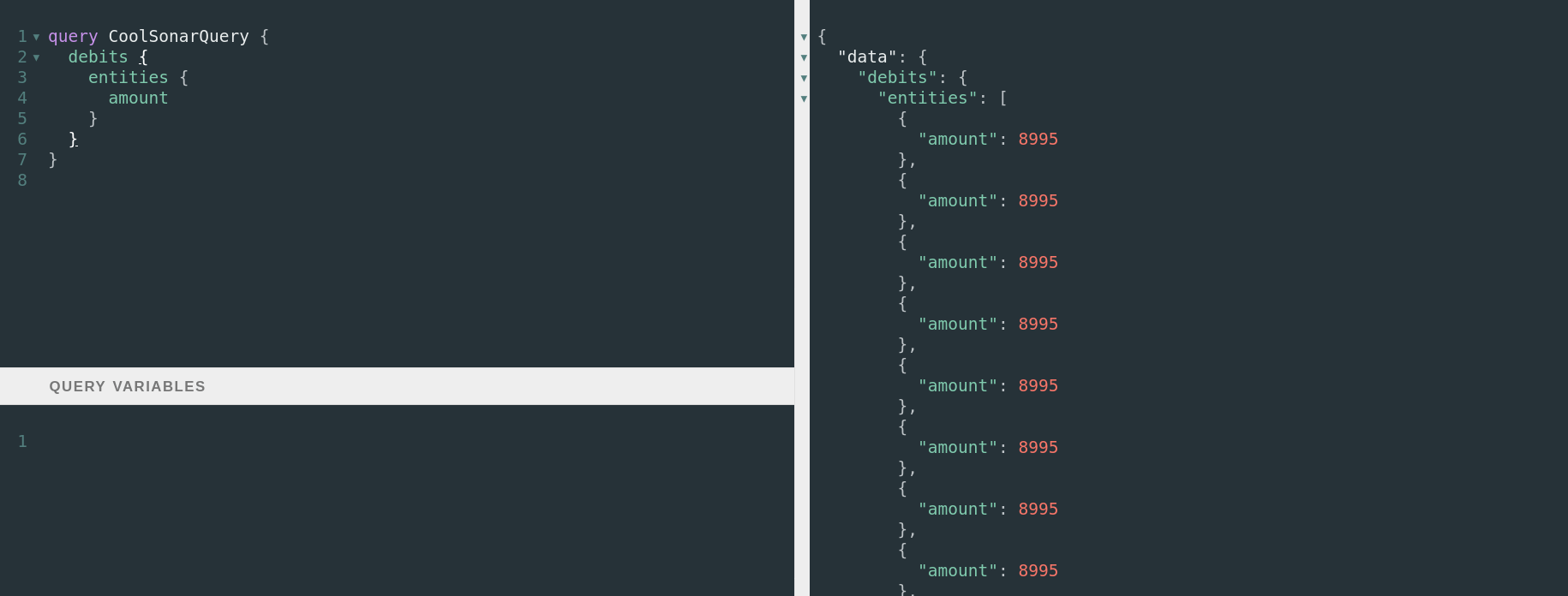
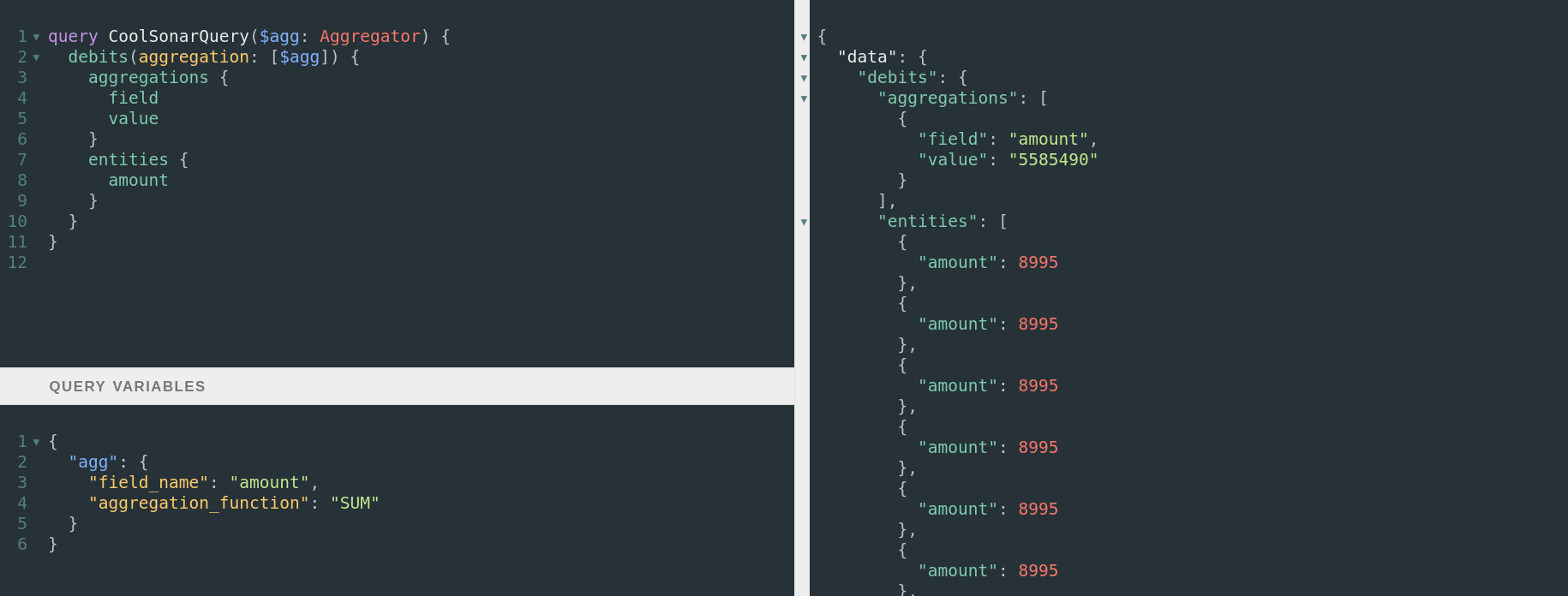
Let's start with a simple one - a sum of all the debits on each account. As you can see, I have a lot of debits - most of them are for 8995 ($89.95.)
But what I really want to know is what the total is of all of them. To do this, I build up an Aggregation object, pass it into the query, and request back the aggregations result as well. As you can see below, the total of all of these is 5585490, or $55,854.90. Note that this result is for all the debits in Sonar - not just the ones that are visible in the result. No matter what I set my pagination to, aggregation is always run across the entire data set.
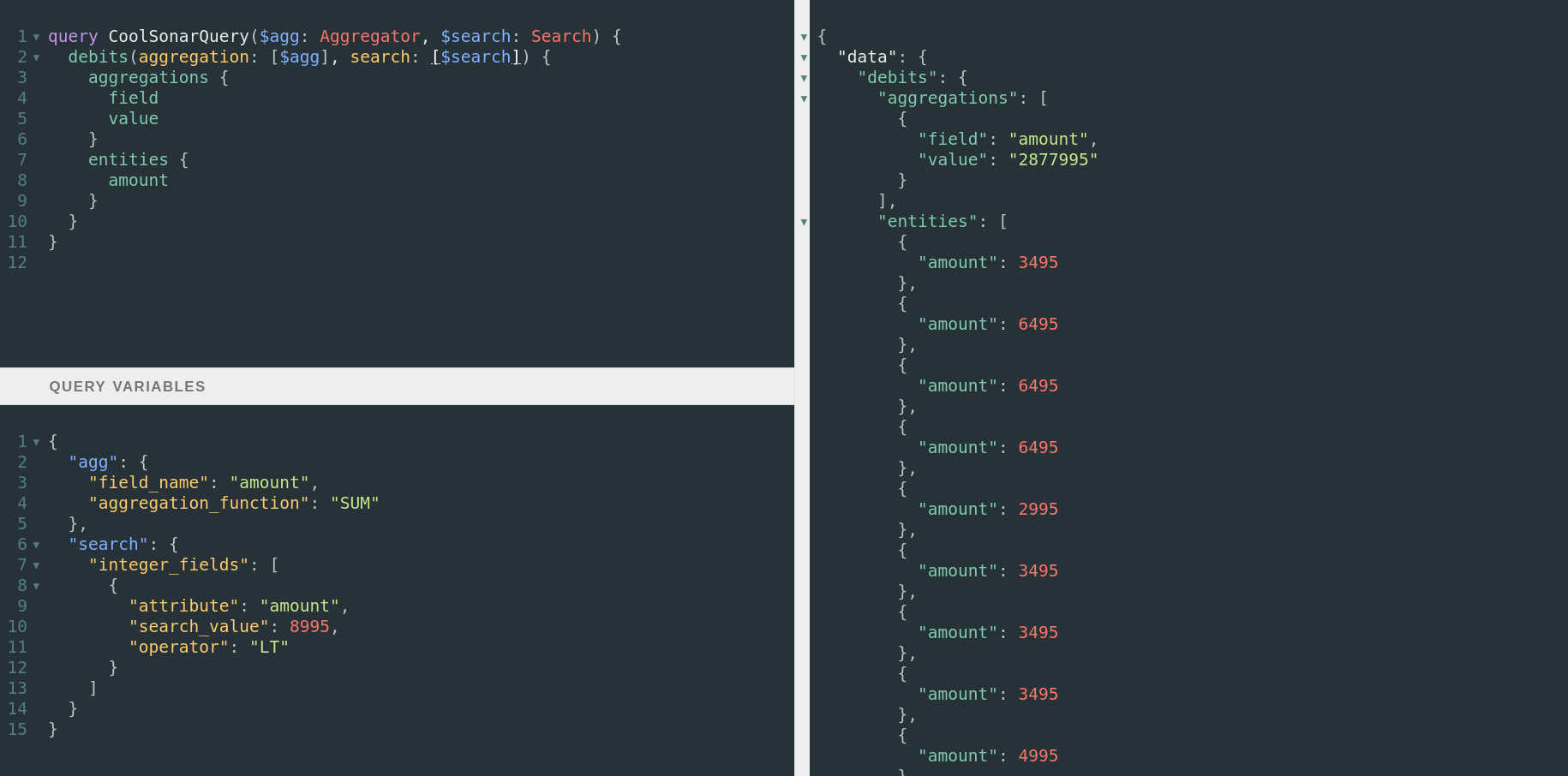
However, any searching or filtering I do will affect the aggregation. Here, I've added a Search object to only return debits that are less than 8995. This reduced my aggregated amount to 2877995, or $28,779.95.
In the next article, I'll teach you about mutations and how to create, update and delete data in the Sonar API.
Frequently asked questions
What is a polymorphic relationship in the Sonar API?
A polymorphic relationship has a generic name but can return an entity of multiple types. For example, an IP assignment can exist on an inventory item, an account, a network site, a RADIUS account, and more. In Sonar, these relationships always end in able (such as ipassignmentable, addressable, or contactable).
How do I return fields that aren't shared across all entities in an interface?
Interfaces only expose fields shared by every entity that implements them. To get entity-specific fields like value or inventory_item_id, modify your query to request those fields conditionally based on the entity type returned, which you can identify using the __typename property.
Do aggregations respect pagination in the Sonar API?
No. Aggregations always run across the entire data set regardless of your pagination settings. However, any search or filter you apply to the query will affect the aggregation result.
Questions, answered.
How do you query polymorphic relationships in the Sonar GraphQL API?
Sonar's polymorphic relationships always end in 'able', such as ipassignmentable, addressable, and contactable. You can use the GraphQL __typename property anywhere in the Sonar API to return the name of the entity being returned, which helps you identify which type a polymorphic relationship resolves to.
What is a reverse relation filter in the Sonar API?
A reverse relation filter lets you search against an entity's relations rather than the entity itself. The filter's search property is itself a Search object, so you can build nested searches against related records.
How do aggregations work in the Sonar GraphQL API?
Aggregations in the Sonar API always run across the entire data set regardless of pagination. Any search or filter you apply does affect the aggregation, so the result reflects the filtered set rather than just the current page.
What features does the Sonar GraphQL API support for complex queries?
The Sonar API is GraphQL-powered and supports interfaces, polymorphic relationships, complex searches, reverse relation filters, and aggregations. These let you construct detailed and powerful queries against your data.
See it on the platform
20 minutes wired to your operation.
An ISP-only specialist walks Sonar through your specific use case. No generic deck, no horizontal SaaS pitch.
Book a meeting