
Product
How GraphQL Mutations Work in the Sonar API
GraphQL mutation is something that changes data. Whether you’re creating, updating, or deleting, running a mutation will always cause data to be modified.
September 25, 2020 · 5 MIN · UPD JUN 16, 2026
In the Sonar API, a GraphQL mutation is any operation that changes data. Whether you are creating, updating, or deleting, running a mutation will always modify data. This guide walks through how mutations work in the Sonar API, from building an input object to reading success and error responses.
In GraphQL, a mutation is something that changes data. Whether you’re creating, updating, or deleting, running a mutation will always cause data to be modified. Let’s jump into how mutations work.
Mutations in the Sonar API are always named for what they do, and written in camelCase. Here, I’m looking at the createAccountStatus mutation in GraphiQL.
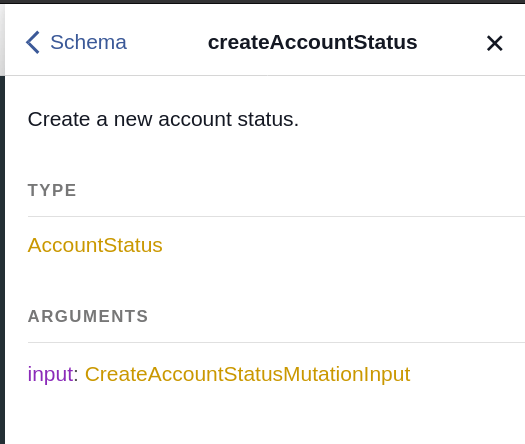
Mutations tend to (generally) be pretty simple in Sonar. They take an input object, and return the object that you’re affecting. In this case, the mutation takes a CreateAccountStatusMutationInput object and returns an AccountStatus entity.
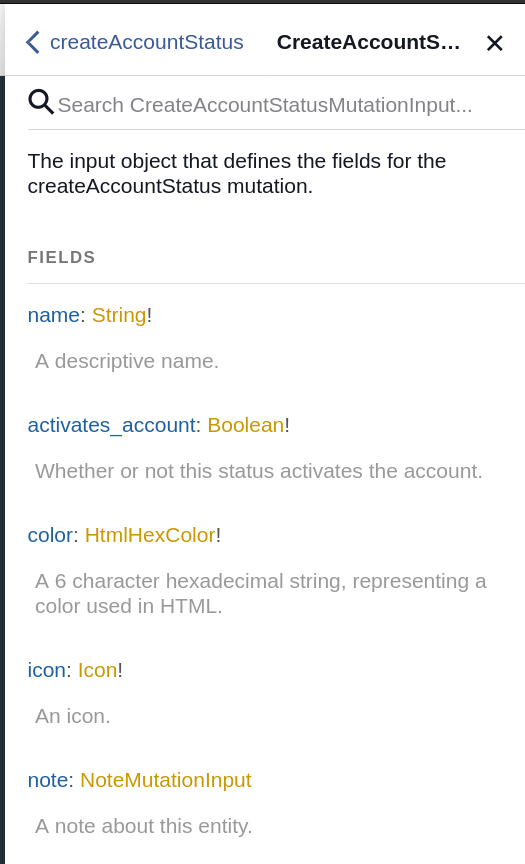
Required vs optional fields in a mutation input
The CreateAccountStatusMutationInput object has a number of properties that can be input. Remember, anything ending in a ! is required, and properties that don’t end in a ! are not, so in this case, you must input name, activates_account, color and icon. Let’s start building up this mutation!
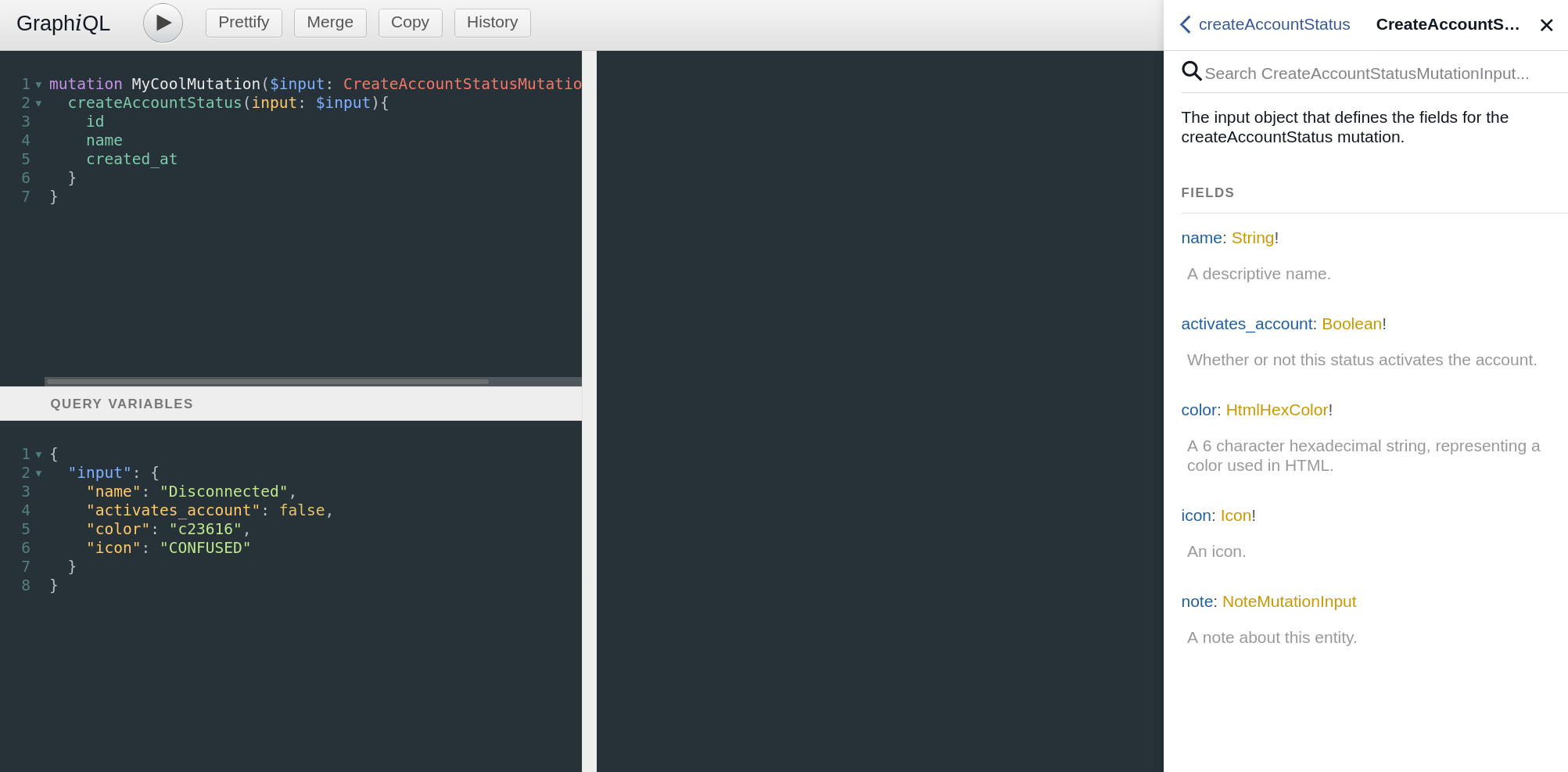
This should look pretty familiar if you’ve been following the series. I made a mutation called MyCoolMutation and input a variable to it called $input, which is then submitted into the createAccountStatus mutation. Because this mutation returns an AccountType object, I can request any fields from that object that I want back inside the mutation - in this case, I asked for id, name and created_at.
Down in the variables section, I’ve built up my input object with the fields that are required by the mutation. name and activates_account are pretty self explanatory. color and icon are represented by two types of properties we haven’t talked about yet - a scalar, and an enum, or enumeration type.
Scalars and enums in the Sonar API
A scalar is a type of input that has to be in a specific format, and validation is applied against it. In fact, every input in Sonar is a scalar - a string is a scalar input, where the validation check is that the input is a string. A float is a scalar input, where the validation check is that the input is a decimal, or floating point number. In this case, the color property is a type of scalar called HtmlHexColor. You can click on the scalar definition in the documentation to see a description of what it requires.
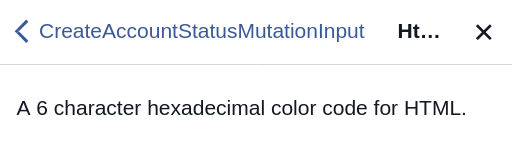
Pretty simple - especially if you know HTML. If you don’t, I often like to use www.flatuicolors.com as a way to grab some pleasing colors. In this example, I’m going to use c23616, which is described on www.flatuicolors.com as Harley Davidson Orange.

Now onto the icon! The icon is an enum named Icon. An enum is a string with a list of valid options. In this case, the valid options are names of icons available in Sonar. Again, we can click on Icon to see our options.
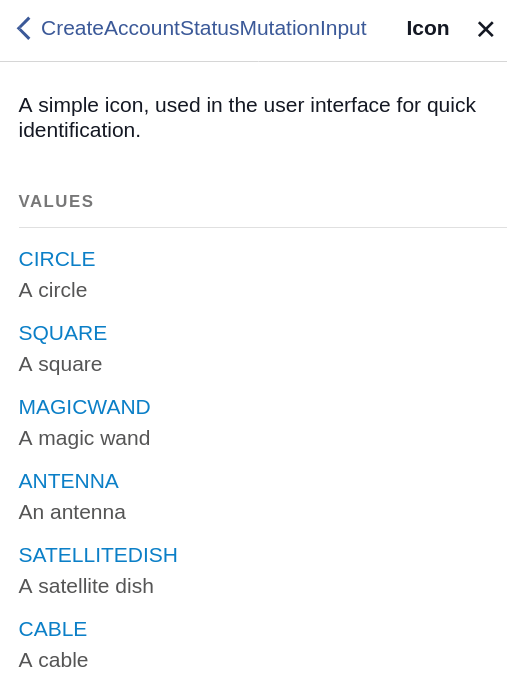
In my case, I’m going to pick CONFUSED. Let’s get this mutation built!
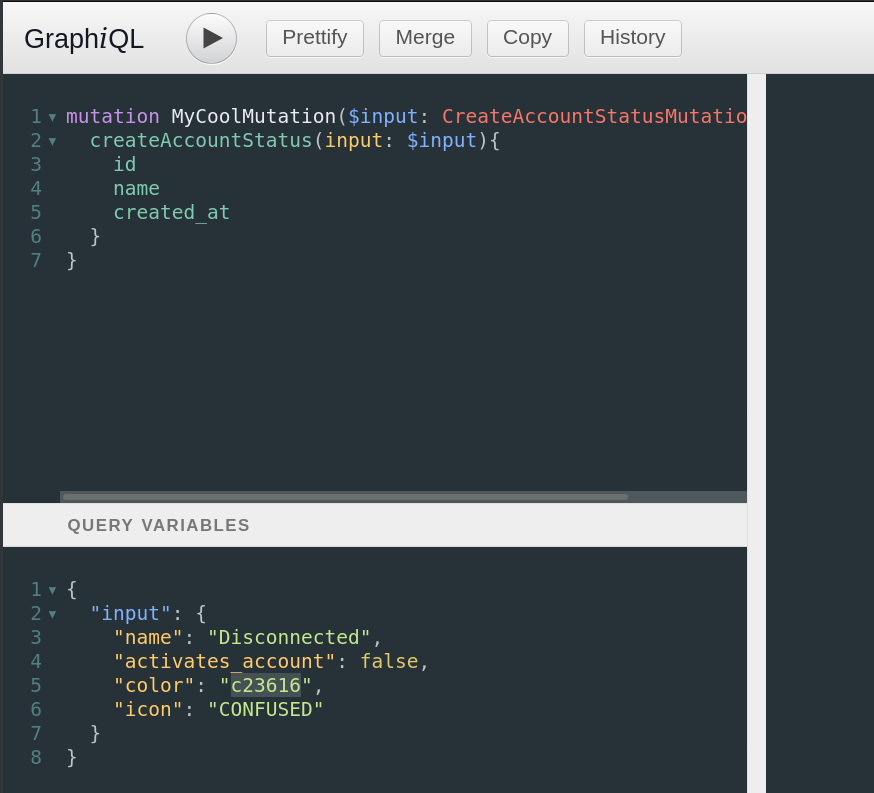
Now I’ll submit it, and see what we get back.
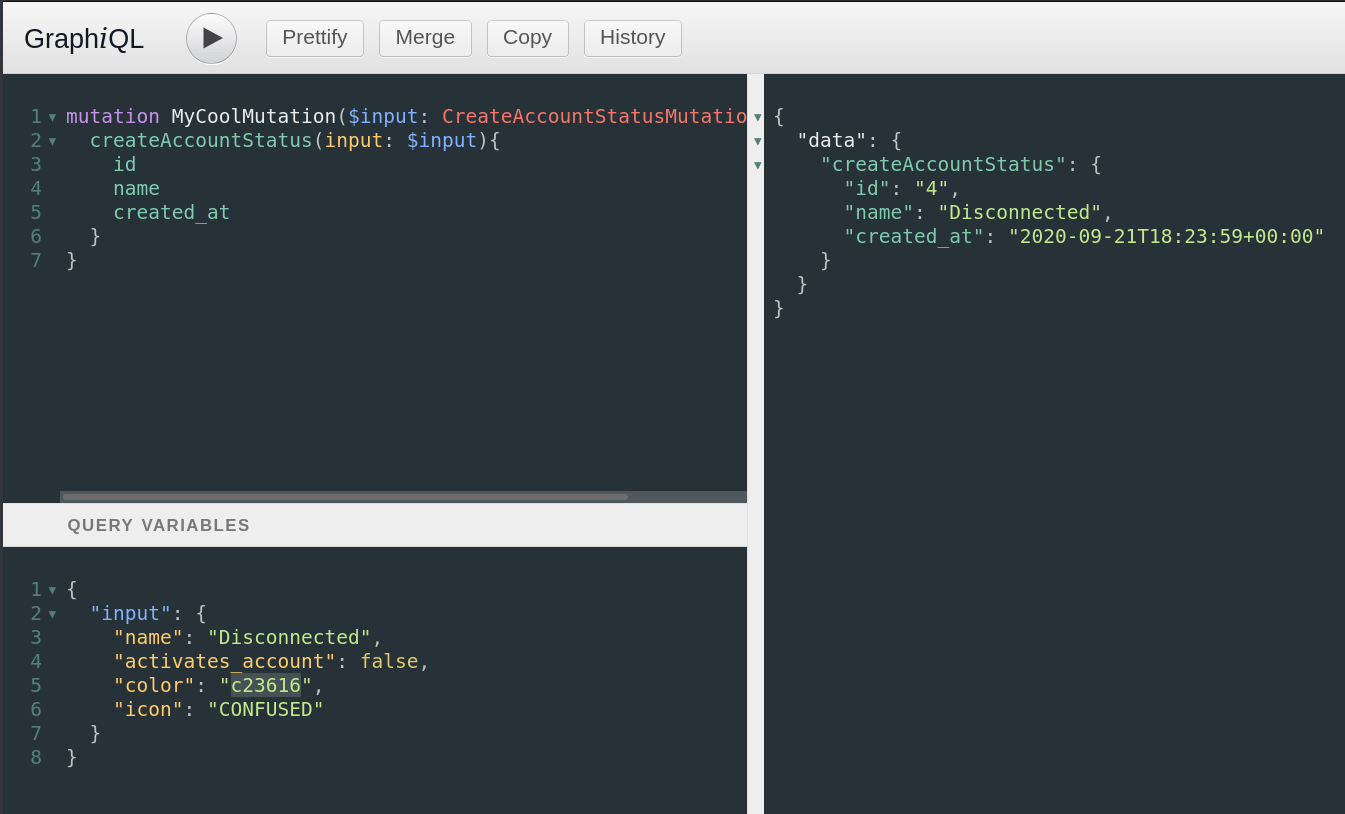
Reading mutation responses: success and errors
Mutations always return a standard format - the property data for the data being returned, the name of the mutation as a property within that, and then whatever fields I’ve requested inside that. Since I requested id, name and created_at, that’s what I got. Now let’s see what happens if I submit it again.
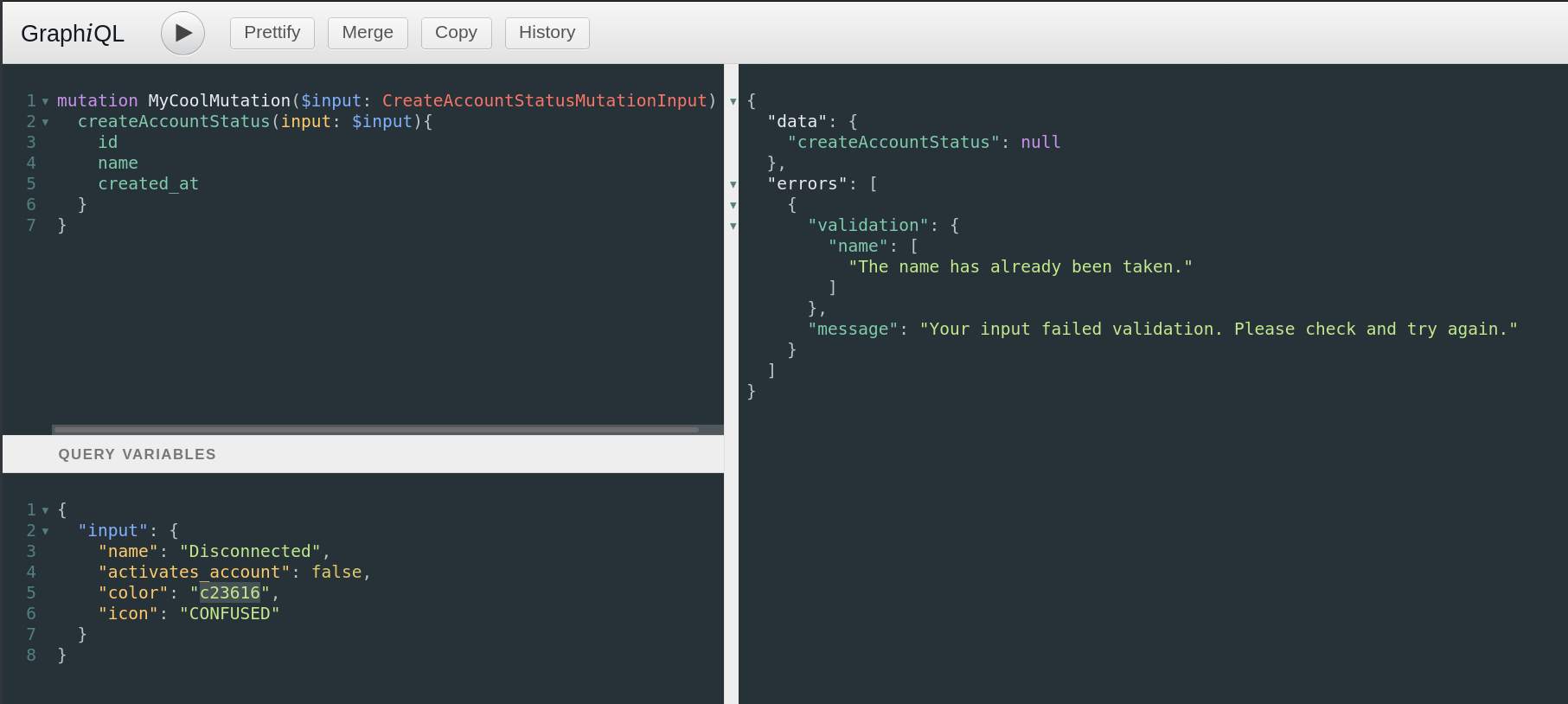
Uh oh - it failed this time. In a failure condition, the mutation name is returned with a null value, and we get a new errors property that describes what failed. In this case, I can see inside the validation property that my name was rejected because it’s already been used. Any field specific failures will always be inside validation, and any more general failures will be inside message. There’s one other type of error response we can get, that I’ll show you by submitting an invalid entry for my input variable - I’ll replace the activates_account value with a string instead of a boolean.
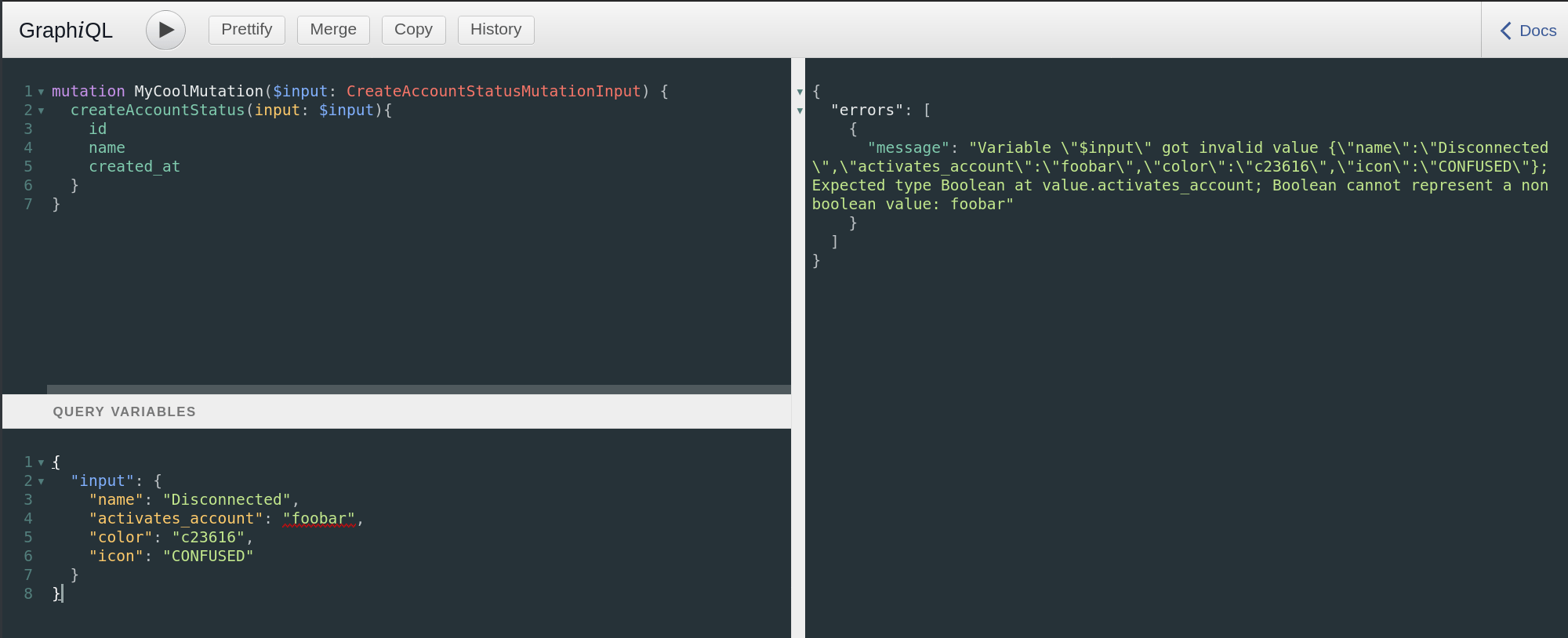
In this case, I get a slightly less user friendly error message. This is because I’ve failed to meet the basic criteria of the input - I’m sending a string instead of a boolean. This fails out at the GraphQL level itself - we haven’t adhered to the requirements of the object, so we get told what our failure is. As long as you always adhere to the documentation, you should never see this type of error - you’ll only get back errors from the application itself in a more user friendly format as shown when I tried to use a name that was already taken.
Congratulations! You’re now armed with enough knowledge to start using the Sonar API to build something great. Let me know what you build - I’m always interested to see what people are coming up with. Stay tuned for more articles shortly.
Frequently asked questions
What is a GraphQL mutation in the Sonar API?
A mutation is any GraphQL operation that changes data. Whether you’re creating, updating, or deleting, running a mutation will always cause data to be modified. In the Sonar API, mutations are named for what they do and written in camelCase.
How do I know which input fields a mutation requires?
In the input object, any property ending in an exclamation mark (!) is required, and any property without one is optional. For the CreateAccountStatusMutationInput object, that means name, activates_account, color and icon must all be supplied.
What is the difference between a scalar and an enum?
A scalar is an input that must match a specific format, with validation applied against it - for example, HtmlHexColor expects an HTML hex color. An enum is a string limited to a defined list of valid options, like the Icon enum that lists the icons available in Sonar.
Questions, answered.
What is a GraphQL mutation in the Sonar API?
A GraphQL mutation is an operation that changes data. In the Sonar API that means creating, updating, or deleting, and running a mutation will always cause data to be modified.
How do you build and submit a mutation in the Sonar API?
Mutations in the Sonar API are named for what they do and written in camelCase. You pass an input object to the mutation, and it returns the entity you are affecting.
How do you know which mutation input fields are required in the Sonar API?
Any mutation input field ending in an exclamation mark is required. Fields without the exclamation mark are optional.
What is the difference between a scalar and an enum in the Sonar API?
A scalar is an input that must match a specific validated format. An enum is a string limited to a list of valid options.
See it on the platform
20 minutes wired to your operation.
An ISP-only specialist walks Sonar through your specific use case. No generic deck, no horizontal SaaS pitch.
Book a meeting