
Operations
Dispatcher Do's and Don'ts for ISP Field Service Teams
Check out the do’s and don’ts of a dispatcher in our latest blog post.
March 8, 2023 · 5 MIN · UPD JUN 16, 2026
An ISP dispatcher is the person behind the scenes who makes sure field technicians have everything they need to complete a job order: scheduling, equipment, routing, and clear job details. Strong dispatching keeps truck rolls efficient and customers satisfied, which protects revenue.
A dispatcher is a person behind the scenes who helps field technicians execute their onsite jobs. They are heavily relied on to make sure the field technicians have everything they need to complete a job order. This may involve scheduling appointments, ensuring equipment, proper routing, etc. They are responsible for understanding the customers' timely needs and their technician's availability.
The role of a dispatcher is critical for your field technicians to get their job done. Field technicians rely on receiving information related to when and where they need to be. When the needs are met for field technicians, it paints a clear picture of their daily tasks. Developing good practices as a dispatcher leads to more timely and efficient jobs, which can lead to satisfied customers that impact an increase in revenue as an ISP.
This blog will further explain the do's and don'ts of a dispatcher:
Dispatcher Do's
Prioritize Scheduling and Routing
Taking on scheduling responsibilities is important so your field technicians are able to see what appointments are going to be taking place. This includes displaying information such as location, time, job specifications, time of travel and other needs. Keeping schedules up-to-date will help your technicians prepare and understand the tasks that are expected. Keep in mind that routing is just as important when sending a technician on a job site. Having a GPS in place that can get them from point A to point B in the quickest way possible will be beneficial. Having a system in place that is realistic about completing jobs in a timely manner and enables safety will increase efficiency between jobs.
Communicate Effectively With Technicians and Customers
With established communication rules, field technicians will have everything they need on-site to complete jobs. Communicating with customers about on-site window hours will allow them to prepare for the arrival of field technicians. As a dispatcher, making sure your field technicians are aware of any delays, weather conditions, minimal supplies, or anything that may disrupt their time is important to convey. This will then allow technicians to communicate with customers on-site as to what can be done. Communication is a powerful practice that provides clarity and order.
Enable Proper Equipment for Every Job
To make sure that on-site jobs are completed, field technicians need to have the proper equipment in place. This may include GPS, mobile computers, software, scanners, and more. As a dispatcher, relaying a list of all equipment needed for a job will be helpful for technicians when they are going to different locations. In each appointment, all of the necessary equipment should be listed where it is visible for both dispatchers and technicians. Having the proper tools and equipment for commuting and completing jobs will make a better experience for those working as well as your customers.
Dispatcher Don'ts
Don't Create Schedule Conflicts
Avoiding disorganization concerning schedules can save your dispatcher, field technicians, and customers time. Having schedule conflicts can confuse and take someone's time away. To avoid these issues, take location and urgency into consideration. Be sure technicians understand how long it may take to get to a location and dispatchers should be aware of the times between different jobs. It is also important to take into consideration the experience of each technician and their capabilities. This will improve efficiency and customer satisfaction. Customer urgency is another factor to note. Making sure that jobs can be completed promptly with the proper equipment will prevent conflicts from occurring.
Don't Let Disorganization Pile Up
A dispatcher has many responsibilities to take care of. At times, it may be difficult to keep up with all scheduled appointments for different technicians at different locations. Staying organized is one of the most important practices as a dispatcher. This helps tremendously with assigning the right technicians to the correct field site, prioritizing service tasks, and more. Having to mix and match all of these variables can be difficult as there is a lot to keep track of. One small mistake can lead to a mix-up. As a dispatcher, try to stay as organized as possible so everyone can get the job done.
Don't Rely on Heavy Paperwork
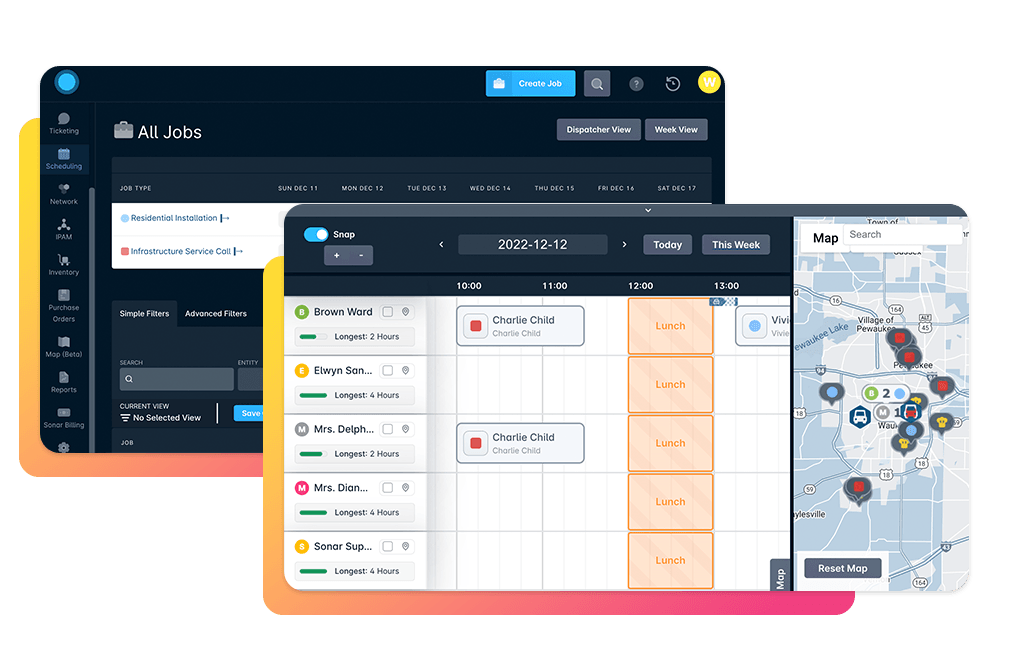
Paperwork can be great to have documentation at times. For the responsibilities of a dispatcher, it is ideal to stay away from heavy paperwork as it may be hard to keep up with overtime. It puts limitations on communication between a dispatcher and field technicians. If there is a time-sensitive issue, it is easiest to communicate using a cloud-based software that provides scheduling management. Having a software cloud with a scheduling dashboard paints a clear picture of when and where jobs are planned out. Having all of your information in one place provides easy accessibility to appointments, equipment, drive times, completed jobs, etc.
Sonar Field Service and Dispatch
Sonar Software provides modern scheduling tools to improve your field technicians performance and job completion success rates. Our scheduling interface allows for check-in and completion of work in the field and gives you the ability to track technicians, check job status, and schedule new work. All tasks can be completed from a smartphone, laptop, or tablet, which means no more printed work orders.
Our user-friendly Sonar Field Tech App improves field technicians performance by providing access to schedules, inventory, equipment and more.
Some features include:
Automatically provision and activate accounts
Online and offline mode
Detailed service history of the equipment
Update account data, add notes, upload documents and photos
Customizable task lists
Generate invoices, and contracts and collect e-signatures
Automatically add installation fees
To learn more about field service management within sonar, click here: Sonar field service and dispatch
Frequently asked questions
What does an ISP dispatcher do?
A dispatcher works behind the scenes to make sure field technicians have everything they need to complete a job order, including scheduling appointments, ensuring the right equipment, and planning proper routing based on customer needs and technician availability.
Why should dispatchers move away from heavy paperwork?
Heavy paperwork is hard to keep up with over time and limits communication between dispatchers and technicians. For time-sensitive issues, cloud-based scheduling software keeps appointments, equipment, drive times, and completed jobs in one accessible place.
How does better dispatching affect an ISP's revenue?
Good dispatching practices lead to more timely and efficient jobs, which can produce satisfied customers and, in turn, an increase in revenue for the ISP.
Questions, answered.
What does a dispatcher do for ISP field technicians?
A dispatcher works behind the scenes to make sure field technicians have everything they need to complete a job order. This includes handling scheduling, equipment, and routing so technicians are prepared before they head out.
What are the do's and don'ts of an ISP dispatcher?
Dispatchers should keep schedules up to date and avoid schedule conflicts by accounting for location, urgency, travel time, and each technician's experience and capabilities. They should avoid relying on heavy paperwork and instead use cloud-based scheduling software to manage time-sensitive issues.
How does effective dispatching improve field technician efficiency?
Good dispatching practices lead to more timely, efficient jobs and satisfied customers. Keeping schedules current and pairing routing with GPS helps technicians prepare and travel from point A to point B in the quickest way possible.
Why should ISP dispatchers avoid heavy paperwork?
Cloud-based scheduling software is easier than heavy paperwork for resolving time-sensitive issues and keeping appointments. It keeps appointments, equipment, and drive times together in one place.
See it on the platform
20 minutes wired to your operation.
An ISP-only specialist walks Sonar through your specific use case. No generic deck, no horizontal SaaS pitch.
Book a meeting