
Product
DHCP Delivery for ISPs: Option 82, Remote ID, and Sonar
For a long time, Sonar has handled DHCP and option 82 requests for large networks using the Sonar DHCP Batcher. Now, this functionality has been expanded a
February 14, 2022 · 8 MIN · UPD JUN 16, 2026
Delivery in Sonar lets ISPs assign IP addresses, identify subscribers via Option 82 Remote ID, and record lease activity automatically. As of Sonar v2, this runs natively in the cloud, no separate batcher required.
For a long time, Sonar has handled DHCP and Option 82 requests for large networks using the Sonar DHCP Batcher. Now, this functionality has been expanded and integrated directly into Sonar, thanks to the cloud scalability of Sonar v2!
If you have a scenario where a DHCP batcher must still be set up, or you are a current Sonar V1 customer, the original documentation on setting up the Sonar batcher can be found here: Setting Up a DHCP Batcher
What is DHCP?
Dynamic Host Configuration Protocol (DHCP) is a network management protocol used to automate the process of configuring devices on IP networks.
DHCP is used by some ISPs as a way to assign IP addresses on their networks. The IP addresses can be assigned to ISP-controlled equipment (such as a wireless radio, fiber , cable modem, or other device) or directly to customer equipment, such as a router or PC.
What are the problems with DHCP on an ISP network?
DHCP assignment can be problematic for some ISPs, as if you are delivering IP addresses directly to end user equipment, you need some mechanism in place to determine that they are authorized to be accessing the network. You also need some mechanism to prevent them from obtaining more IP addresses than authorized, so that they can't deplete your available IP pools.
How DHCP assignment works
The process of DHCP assignment is pretty simple. First, a device requests an IP address via DHCPDISCOVER. A listening DHCP server can then reply with a DHCPOFFER that contains an IP address for the client to use. The client then responds to the DHCPOFFER with a DHCPREQUEST, and the server responds with a DHCPACK, acknowledging that the client is using that IP.
The IP address that is offered by the DHCP server can be set in a wide variety of ways. Commonly, in an ISP network, the IP is either selected from a pool of available IPs, or a static reservation is set for the particular client. In either scenario, this IP could be a public address, or in the case of IPv4, a private address (typically used with Carrier Grade NAT.)
The simplest way to make this work with IPv4 is for an ISP to deploy a controlled edge device that makes the DHCP request and assigns the IP to itself. The customer then connects their devices to the ISP-controlled edge device, which runs network address translation, and provides the customer equipment with a private IP.
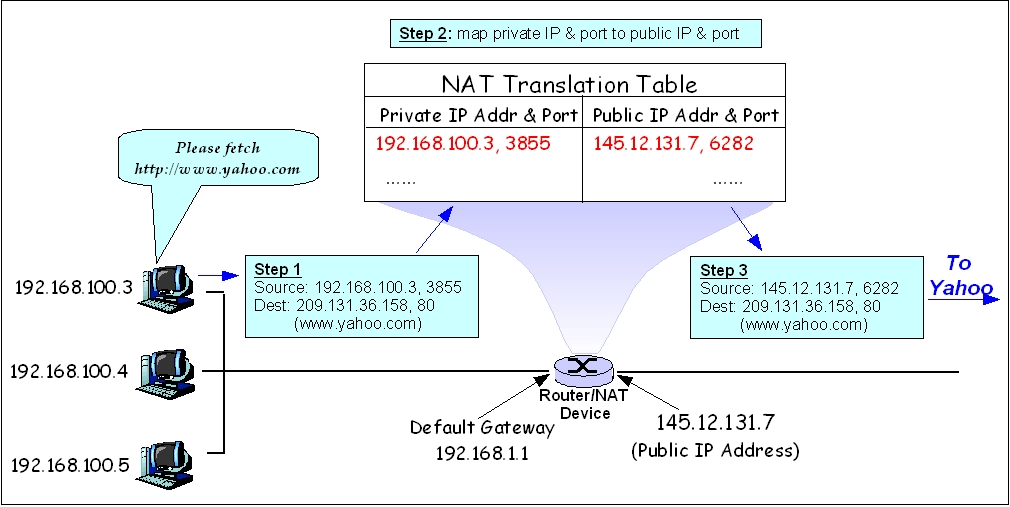
This configuration can often be problematic for customers though. If the customer is running any servers inside their network that need to be publicly accessible, the ISP has to manage port forwarding rules inside their edge device. Also, if a customer connects a device behind the ISPs edge device that is also performing NAT, this can frequently create issues with services such as VoIP or online gaming due to the double NAT configuration.
How Sonar handles DHCP
For a long time, we've had two approaches to handling DHCP in Sonar. The first is that a user can assign an IP address directly to a specific MAC address, and Sonar will write this static reservation into a DHCP server. This results in the client with that MAC address receiving the statically assigned IP every time they make a DHCP request.
The second option is to have the DHCP server deliver a notice of IP assignment (e.g. a successful DHCPACK) to Sonar, and Sonar then looks up the customer that the IP has been assigned to using the MAC address, or the Remote ID, which is sent using DHCP option 82, which we'll talk about a little more in a minute! If the customer can be identified, Sonar will record the IP assignment, and then remove it once it expires.
DHCP Option 82 and Remote ID
As mentioned earlier in this article, one of the issues with DHCP on an ISP network is identifying the source of a request. If a customer goes to a store, buys a brand new router, plugs it into the ISP network, and requests an IP, how does the ISP know who the customer is, or whether or not they are authorized to access the network? This is where DHCP Option 82 comes in!
Option 82 allows additional data to be injected into the DHCP request along the path between the requesting client, and the DHCP server. Let's go back to the previous example of a customer buying a new router, plugging it in, and requesting an IP. By itself, it would be very difficult to identify who this customer is. However, with DHCP Option 82 enabled, a device between the customer and the DHCP server can inject information that will allow you to identify them. For example, a cable modem could inject its own MAC address or serial number into the DHCP request, or a wireless access point could inject the MAC address of the radio installed at the customer's house. This information is injected into a special property in the DHCP request called the Remote ID.
How Sonar uses Remote ID to identify subscribers
When Sonar receives a DHCP notification that contains Remote ID information, Sonar will use this information to try to identify the customer, before using the MAC address making the DHCP request. The information injected into the Remote ID property can be anything - if it's a MAC address, Sonar will check for inventory items with a matching MAC address, and use that to identify the customer. If it's a string (for example, a serial number, a username, or some other uniquely identifying piece of information), Sonar will instead look at non-MAC address fields on inventory items to try to identify the customer.
Sonar will also look at LTE SIMs to try to convert the IMSI on the SIM to a MAC address. Many LTE vendors have an algorithm they use to convert an IMSI (which is a fifteen-digit, numeric identifier) into a MAC address. If we are aware of a particular vendors algorithm, we'll perform this conversion to try to identify the appropriate SIM.
How to set up DHCP delivery in Sonar
If you're using the latest version of Sonar, it's easy!
This data needs to be sent to your Sonar URL, adding /api/dhcp to the end of the URL (for example, https://example.sonar.software/api/dhcp.) This can be sent as a HTTP GET or a HTTP POST, and it should contain the following information:
The IP address being assigned or removed, as ip_address
The MAC address of the requesting device, as mac_address
expired as either 1 or 0 depending on whether this IP is being assigned, or removed.
api_key as the API key of the DHCP server sending this data. You can find this value in your table of DHCP servers inside Sonar.
Optionally, remote_id as a string, if there is a remote ID value and you're using DHCP Option 82.
Example DHCP lease script for MikroTik
Generally, you will want to configure your DHCP server to automatically send this data on every IP assignment or removal. The method of doing this will differ from server to server, but here's an example of how to do it with a MikroTik router. This would be placed in the DHCP server script portion of the MikroTik configuration.
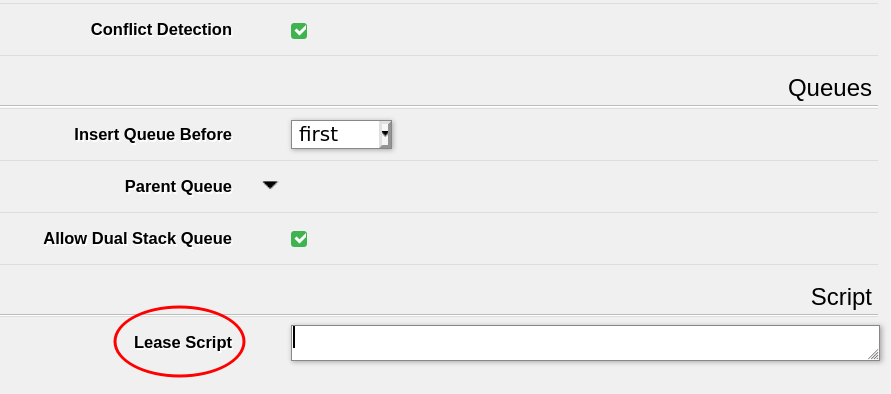
Place this script in the 'Lease Script' section of the DHCP server configuration.
Replace the api_key and url values with your API key and Sonar URL respectively. This script will try and retry to deliver a new DHCP assignment to your Sonar instance, although you can change the maxvariable to set a number of retries in case of failure.
For a full explanation on how you would leverage a DHCP MikroTik script, see the MikroTik: Setting Up a Sonar Controlled DHCP Server article.
Copto Clipboard {
# CONFIGURATION SETTINGS
# ############
# Change these values for your Sonar instance
:local url "instance.sonar.software"
:local apikey "xxxxxxxx-xxxx-xxxx-xxxx-xxxxxxxxxxxx"
# The maximum retries to send to Sonar
:local max 30
# #############
# END CONFIGURATION SETTINGS
# Do not edit below # Each https request has a 30 second retry :local attempts 0
:local success 0
:do { :set attempts ($attempts+1); :if ($leaseBound = 0) do { :do { /tool fetch duration=30s url="https://$url/api/dhcp?ip_address=$leaseActIP&mac_address=$leaseActMAC&expired=1&api_key=$apikey" mode=https as-value output=user; :set success 1; } on-error={ :log error "DHCP FAILED to send unassignment to $url on attempt $attempts out of $max for $leaseActMAC / $leaseActIP"; :delay 3s; } } else { :delay 1s; # see note below :local remoteID [/ip dhcp-server lease get [find where address=$leaseActIP] agent-remote-id]; :do { /tool fetch duration=30s url="https://$url/api/dhcp?ip_address=$leaseActIP&mac_address=$leaseActMAC&remote_id=$remoteID&expired=0&api_key=$apikey" mode=https as-value output=user; :set success 1; } on-error={ :log error "DHCP FAILED to send assignment to $url on attempt $attempts out of $max for $leaseActMAC / $leaseActIP"; :delay 3s; } } :if ($success) do { :log info "DHCP lease message successfully sent $leaseActMAC / $leaseActIP to $url"; :set attempts $max; # break out of the do..while loop }
} while ( $attempts < $max )
}
If you come up with any scripts or plugins for other DHCP servers, be sure to share them with us!
Frequently asked questions
Do I still need the Sonar DHCP Batcher?
Not in most cases. On the latest version of Sonar, DHCP and Option 82 handling is integrated natively thanks to Sonar v2 cloud scalability. The standalone batcher is still documented for Sonar V1 customers or scenarios that require it.
What is DHCP Option 82 used for?
Option 82 injects identifying data, such as a Remote ID, into the DHCP request between the client and the DHCP server. This lets an ISP identify and authorize the requesting subscriber, even when they plug in a brand new, unknown device.
What parameters does Sonar's /api/dhcp endpoint expect?
Send ip_address, mac_address, expired (1 or 0), and api_key via HTTP GET or POST, plus an optional remote_id string when you are using DHCP Option 82.
This article has been updated on 01/25/23
Questions, answered.
What is DHCP and how do ISPs use it?
DHCP automates IP address configuration on IP networks. ISPs use it to assign IP addresses to ISP-controlled equipment or to customer equipment.
What is DHCP Option 82 and how does Remote ID identify a subscriber?
DHCP Option 82 injects identifying data, such as a Remote ID, into the DHCP request. This lets an ISP identify and authorize the subscriber making the request.
How does Sonar handle DHCP assignment and Option 82 requests?
Sonar now handles DHCP and Option 82 requests natively in Sonar v2 cloud, expanding the original Sonar DHCP Batcher. It can write static MAC-to-IP reservations into a DHCP server, or record IP assignments reported by the DHCP server and remove them when they expire.
How does Sonar identify which subscriber is making a DHCP request?
Sonar uses the Remote ID first and then falls back to the requesting MAC address. It can also convert an LTE SIM's IMSI to a MAC address to identify the subscriber.
See it on the platform
20 minutes wired to your operation.
An ISP-only specialist walks Sonar through your specific use case. No generic deck, no horizontal SaaS pitch.
Book a meeting